Add Leads to a Campaign
Learn how leads enter Social Campaigns, which sources are one-time imports vs always-on enrollment, and why Signals should usually be your primary fuel.
Written By Kevin Lawrie
Last updated About 1 month ago
Lead Management is where you decide how people enter a campaign.
In getsignals, that decision matters because lead source is not just about volume. It affects timing, context, and how relevant the outreach feels once the campaign starts.
That is why our methodology is Signal-first.
The best campaigns do not begin with a static list based on titles and industries. They begin with a live Signal, real buyer behavior, or a relationship event that tells you why this person matters right now.
Psst. Yes, you can import spreadsheets from your own external data (ideally signal-driven!) using a CSV.
What a lead needs, by channel
Before you add anyone, know what your campaign's channel type requires:
Any lead missing what its campaign type needs is skipped rather than enrolled, so it's worth checking this before a big import rather than after.
The 6 ways to add leads to a campaign
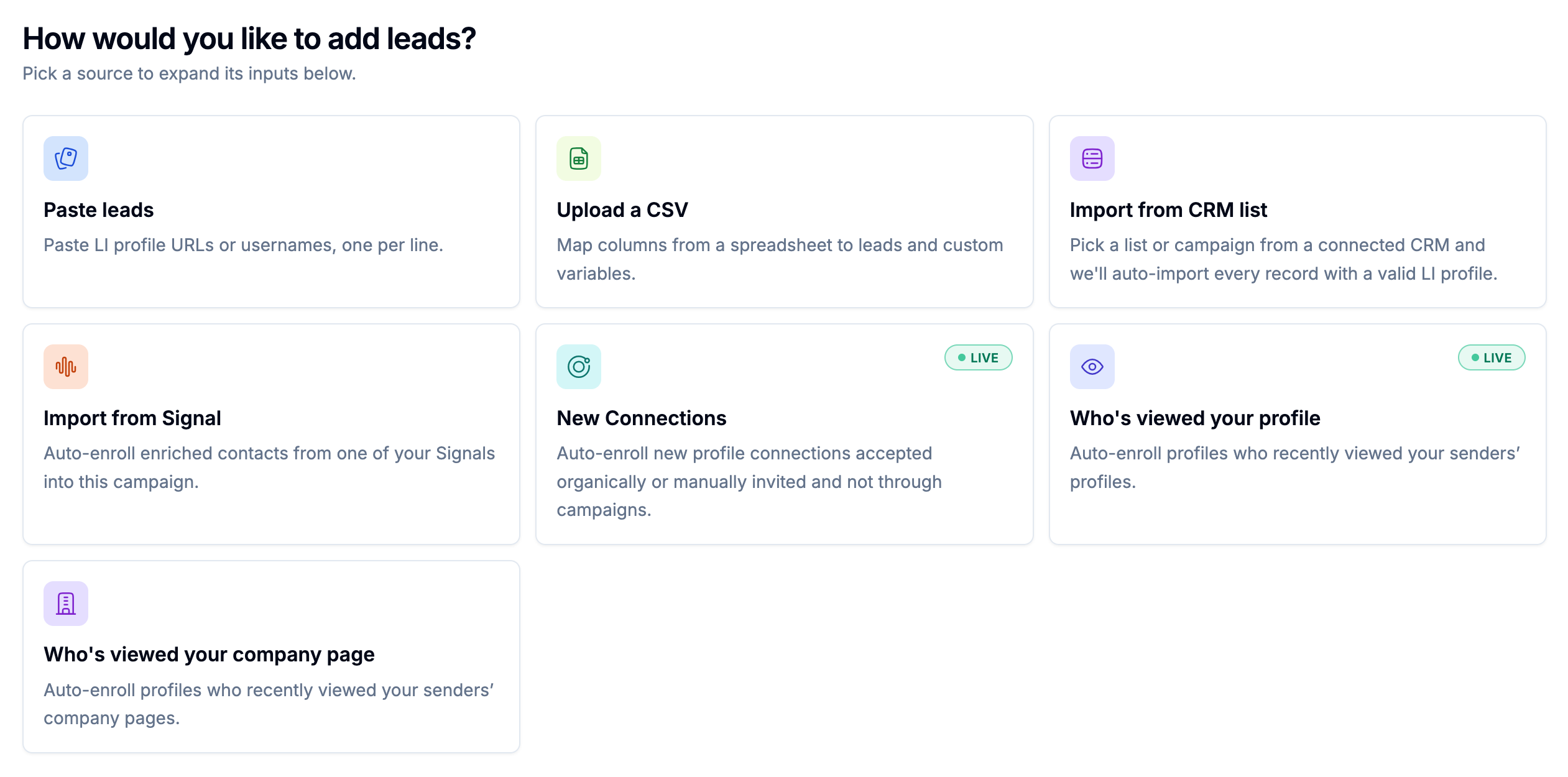
You can add leads to a campaign from six main sources:
Paste profile URLs
Upload a CSV
Import from a CRM list
Import from Signals
Auto-enroll new connections
Auto-enroll profile visitors
Some of these are one-time imports. Others are always-on enrollment sources. Two of them, new connections and profile visitors, are LinkedIn-native concepts and only apply to Social only and Social + Email campaigns; there's no email equivalent for either.
One-time imports vs always-on sources
One-time imports
These are best when you already know exactly who you want to reach.
They include:
pasted profile URLs
CSV uploads
CRM list imports
These are useful for controlled campaign launches, named-account outreach, or moving an existing list into getsignals.
Always-on sources
These are best when you want the campaign to keep filling itself automatically as new opportunities appear.
They include:
Signals
new connections (Social only and Social + Email)
profile visitors (Social only and Social + Email)
These are much closer to the getsignals methodology because they let campaigns respond to live activity instead of stale list data.
The best default: Signals
If you are unsure where to start, start with Signals.
Signals are the strongest source because they do three things at once:
surface people based on live behavior
preserve the context of what surfaced them
enroll them into the right campaign automatically
That means the campaign does not just know who the lead is. It also knows why they were surfaced.
That context can then carry through:
Warm-up
invite notes
DMs
emails
comments
follow-ups
inbox prioritization
This is the biggest difference between Signal-first lead management and legacy list-based outreach. When a Signal has enriched a contact with a verified email, that lead is ready for an Email only or Social + Email campaign the moment it's surfaced, no separate lookup step required.
1. Paste profile URLs
Pasting profile URLs is the fastest way to add a small number of leads manually.
This works well when:
you want to test a campaign with a hand-picked group
you are doing named-account outreach
you have a shortlist of high-priority prospects
you want a controlled first launch before scaling
This is a good option for precision, but it is not an always-on source. Once those leads are added, the flow does not keep feeding itself.
This source works only for Social steps; it doesn't add email addresses. If your campaign includes email, pair this with a CSV or enrichment step so each pasted lead also has a verified address.
Best use case: Use pasted URLs when you want a small, deliberate group of leads and do not need automatic ongoing enrollment.
2. Upload a CSV
CSV import is best when you already have a structured list of leads and want to move them into a campaign quickly.
This is useful when:
you are migrating from another workflow
you already have approved targets in a spreadsheet
you want to include custom fields or extra variables
you want to test a campaign with a larger imported batch
This is also the most straightforward way to bring email addresses in at volume: map your email column during import, and any row missing one is skipped if the campaign requires it.
CSV imports are powerful, but they are still static by nature. A CSV can tell you who someone is. It usually cannot tell you why now. That is why CSV is useful operationally, but weaker strategically than Signals when timing matters.
Best use case: Use CSV when you already have a vetted lead list and want to launch quickly with structure and control.
3. Import from a CRM list
CRM list import lets you use HubSpot, Attio, Salesforce, or SugarAI lists as a campaign source.
This is helpful when your CRM is already segmenting people by:
lifecycle stage
deal status
ownership
qualification state
custom criteria
This source is especially useful when your CRM is becoming a trigger, not just a destination.
But it is still important to understand the tradeoff. A CRM list can tell you who belongs in a segment. It does not always tell you whether they are actively showing social intent right now.
That means CRM imports are useful, but they become much stronger when combined with Signals or other live context. Check that the records in your CRM list carry a verified email if you're running an email-enabled campaign; not every CRM record will.
Best use case: Use CRM list imports when your team already manages lead quality inside the CRM and wants that segment to move into outreach.
4. Import from Signals
This is the most important source in getsignals.
Signals turn Social Campaigns into an always-on system.
Instead of manually refreshing lists, a Signal can automatically enroll people the moment it detects a relevant match, such as:
a post expressing a problem
a buyer-intent comment
competitor engagement
topic or keyword activity
a relationship event like a job change
This is where the architecture becomes meaningfully different from legacy tools.
The Signal is not just sourcing the lead. It is also carrying the reason they matter into the campaign itself.
That means:
the signal post can shape the Warm-up
AI can write from the exact idea the person raised, whether the next step is a comment, a message, or an email
outreach can start with public engagement before the first direct touch
replies can be understood in the context of what triggered the campaign
Why this source is different
With most tools, sourcing and outreach are separate systems. The intelligence dies at the handoff.
In getsignals, the Signal feeds the campaign directly and keeps the context attached all the way through, regardless of which channel carries the next step.
Best use case: Use Signals when you want evergreen lead flow, better timing, and outreach built from real buyer context instead of static list data.
5. Auto-enroll new connections
New connections are a relationship signal.
This source monitors connected accounts for new connections that did not come from a campaign invite and enrolls them automatically into the campaign you choose. This applies to Social only and Social + Email campaigns; there's no equivalent trigger on the email side.
This is useful because not every valuable connection starts inside a campaign.
Sometimes a sender connects with someone manually or organically. Without automation, those warm relationships can fall through the cracks.
This source helps turn those new connections into structured follow-up.
Best use case: Use new-connection enrollment when you want every warm relationship to enter a nurture or follow-up motion automatically.
6. Auto-enroll profile visitors
Profile visitors are a quiet signal.
Someone viewed your profile for a reason. They may not be ready for a buying conversation yet, but they have shown interest, curiosity, or recognition. This is another Social only and Social + Email source; email has no visitor-tracking equivalent to trigger from.
That makes profile visitors a strong relationship signal for lighter-touch outreach or nurture flows.
This source works best when timing matters and you want outreach to happen while your profile visit is still fresh in the lead's memory.
Best use case: Use profile-visitor enrollment when you want to act on quiet interest quickly and consistently.
Which source should you use?
A simple way to choose:
Use Signals when you want the best timing, context-aware outreach, campaigns that feed themselves, and you care about what the buyer is saying, not just who they are.
Use pasted URLs when you want a small controlled launch or have a short list of hand-picked prospects.
Use CSV when you already have a list ready, want a structured bulk import, or need custom fields from a spreadsheet, including verified email addresses at volume.
Use CRM lists when your CRM already defines who should enter outreach, or you want lifecycle or segment-based enrollment.
Use new connections when you want to capture warm relationships automatically. Social channel only.
Use profile visitors when you want to act on quiet interest quickly. Social channel only.
The strongest setup: combine static precision with live Signals
In practice, the best teams usually use more than one source.
A common setup looks like this:
start with a small pasted or CSV list for launch control
add CRM or relationship-based sources where useful
make Signals the always-on source that keeps the campaign fresh over time
That gives you both control and live opportunity flow.
A Signal-first way to think about lead management
When choosing a source, do not just ask: How do I get people into this campaign?
Ask: What source gives me the strongest reason to reach out now?
That is the getsignals mindset.
A static list can tell you who fits your market.
A Signal can tell you who fits your market and is showing relevant behavior right now.
That is what leads to better timing, better context, and better replies, on whichever channel you reach them through.
Common mistakes to avoid
Treating every source as equal. They are not equal. Some sources give you timing and context. Others only give you identity.
Overusing static imports. CSV and CRM imports are useful, but they should not become your only growth engine if you want live, signal-driven outreach.
Ignoring source intent. A profile visitor, a new connection, and a buyer-intent Signal do not represent the same level of urgency. Campaign strategy should reflect that.
Forgetting why Signals matter. Signals are not just another import source. They are the source that keeps the reason for outreach attached all the way through the campaign.
Assuming every lead has an email just because they have a LinkedIn profile, or vice versa. Check your channel's requirements before importing at volume, or you'll find out about the gap after the fact, as a pile of skipped leads.
Final advice
If you want better outreach, do not just optimize the sequence.
Optimize what feeds the sequence.
The best-performing campaigns are usually fed by the strongest context.
In getsignals, that usually means Signals first, then supporting sources around them, with the right contact detail already attached for whichever channel you're reaching them on.