Waterfall Email Finder — Prospeo, LeadMagic, and Leadfwd
The waterfall email finder automatically checks multiple data providers in sequence until it finds a verified email address for each contact. You can use the platform's built-in finder, connect your own provider accounts, or combine both.
Written By Kevin Lawrie
Last updated 6 months ago
How the waterfall works
When email finding is enabled — either on a Signal or from the Contacts manager — the platform works through your configured provider sequence one by one:
Try Provider 1 → verified email found? Stop. Done.
No result → try Provider 2 → verified email found? Stop. Done.
No result → try Provider 3 → and so on.
The waterfall stops as soon as a verified email is found. If no provider finds a result, no credit is charged for that contact.
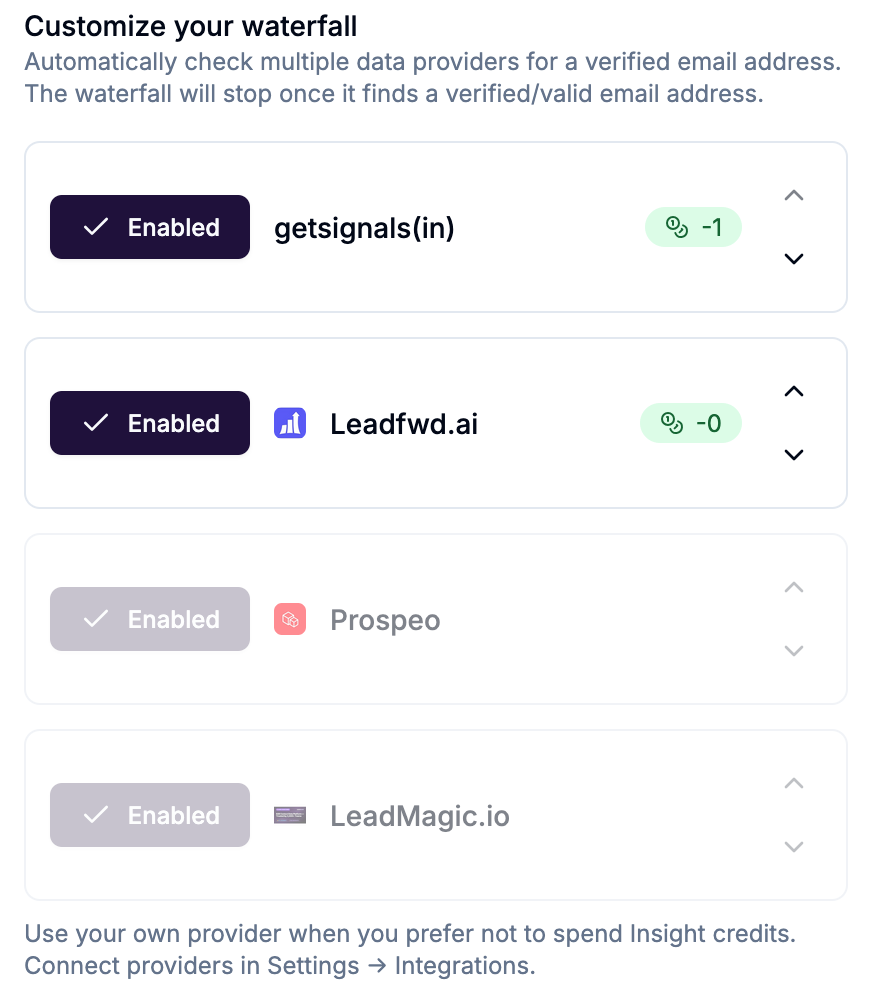
Providers and credit costs
When you use a connected third-party provider, their own subscription credits are used — not your platform credits. Connecting Prospeo or LeadMagic and moving them to the top of your sequence effectively reduces your email finder cost to zero platform credits.
Configuring the waterfall
On a Signal (automatic)
In the Signal Configure step, the Email and Mobile Finder block appears on the right side once any contact capture option is enabled.
Click Enable and configure.
Toggle Email finder on.
The provider sequence appears. Drag providers to reorder — the top provider is tried first.
Enable or disable individual providers using the toggle on each row.
From the Contacts manager (manual)
Select contacts → click Find Email in the action bar → configure the provider sequence → click Start Finding Emails.
A progress bar shows results in real time. You can cancel mid-run.
Provider sequence strategy
If you have no third-party providers connected: Only getsignals(in) is available. Each verified email found costs 1 platform credit.
If you connect one provider (e.g. Prospeo): Move Prospeo to the top. It runs first at no platform credit cost. getsignals(in) acts as the fallback for contacts Prospeo can't find.
If you connect multiple providers: Order them by your preference for data quality or coverage. The waterfall stops at the first verified result regardless of which provider found it.
💡 Tip: Connect at least one third-party provider and put it first in the sequence. For high-volume Signals enriching hundreds of contacts per run, this can save significant platform credits.
Mobile finder
The mobile finder works independently of the email finder — it does not use a waterfall. It runs against the platform's built-in provider only.
Cost: -10 credits per verified mobile number found. No charge if no number is found.
Enable it in the same Email and Mobile Finder block by toggling Mobile finder on.
Given the higher cost per result, enable mobile finding only for contact segments where a direct phone number is genuinely worth the credit cost — typically high-value enterprise prospects or specific outreach campaigns.
Email verification statuses
After the finder runs, each contact's email is marked with a status:
Filter by email status in the Contacts manager using the Field Filter (Email Status equals verified) to segment contacts ready for outreach.