Manage every reply from every sender
Work every conversation across every connected sender in one place, prioritize the replies that matter, and keep signal context attached as conversations move forward.
Written By Kevin Lawrie
Last updated About 1 month ago
The Unified Inbox is where Signal-first outreach becomes pipeline.
Signals surface the opportunity. Campaigns act on it, across LinkedIn, email, or both. The Unified Inbox is where you manage the replies that come back, regardless of which channel they arrived on.
This matters because outreach is only half the system. Once a lead responds, the goal is no longer automation. The goal is to focus your attention on the conversations most likely to turn into meetings and revenue.
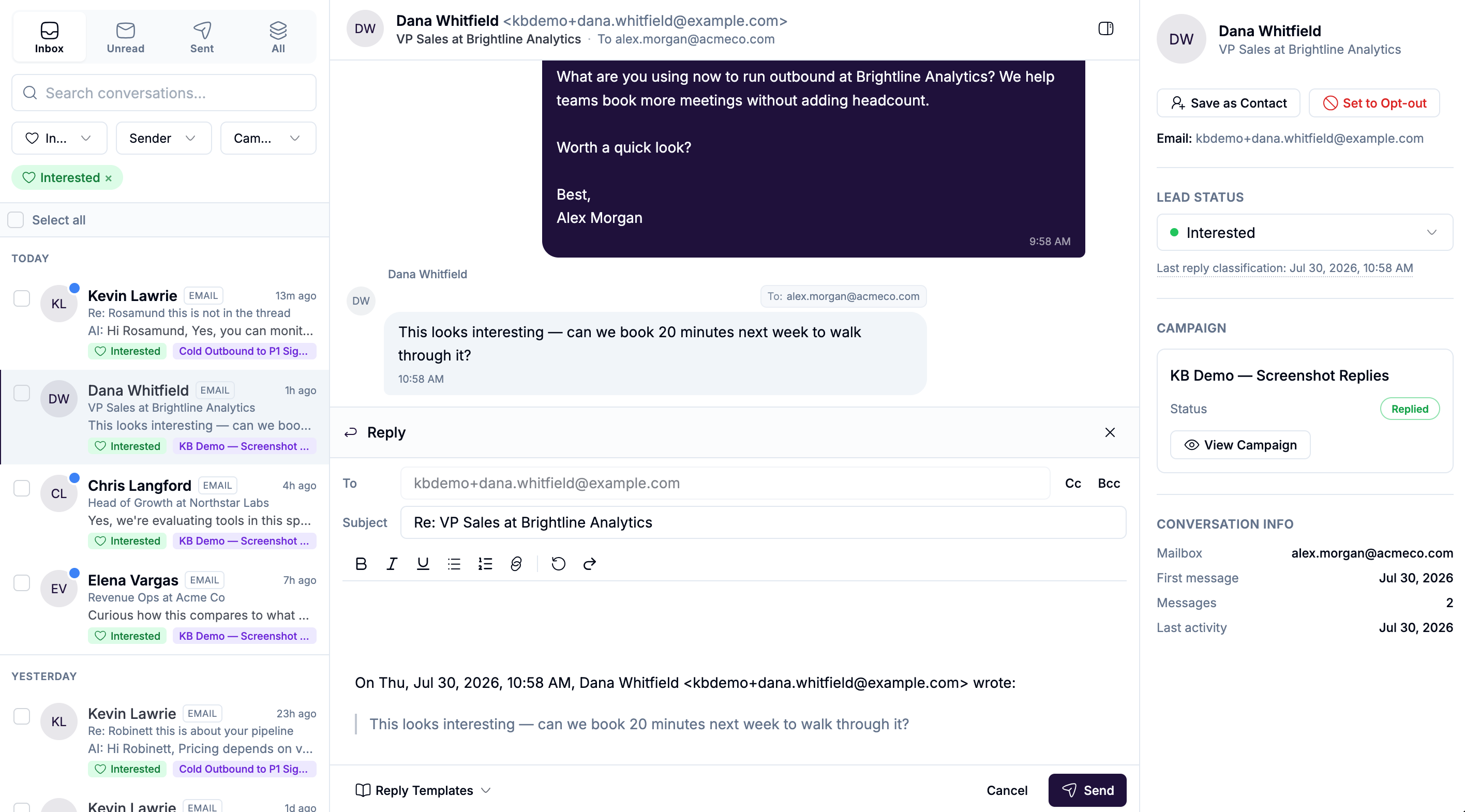
Why the Unified Inbox matters
Most tools make you jump between accounts, tabs, and inboxes, and most treat email and social as two entirely separate products.
The Unified Inbox brings every conversation from every connected sender, social accounts and mailboxes alike, into one place so you can:
review replies across all accounts and both channels
prioritize the conversations that matter most
respond without losing campaign context
update lead status as the conversation evolves
That means you do not have to manage outreach account by account, or channel by channel. You can manage demand from one operating layer.
What makes this inbox different
The Unified Inbox is not just a message feed.
Because getsignals is Signal-first, each conversation sits on top of a deeper context layer:
the Signal that surfaced the lead
the campaign that enrolled them
the sender account handling the conversation, whether that's a Social Sender or a mailbox
the lead's status in the outreach flow
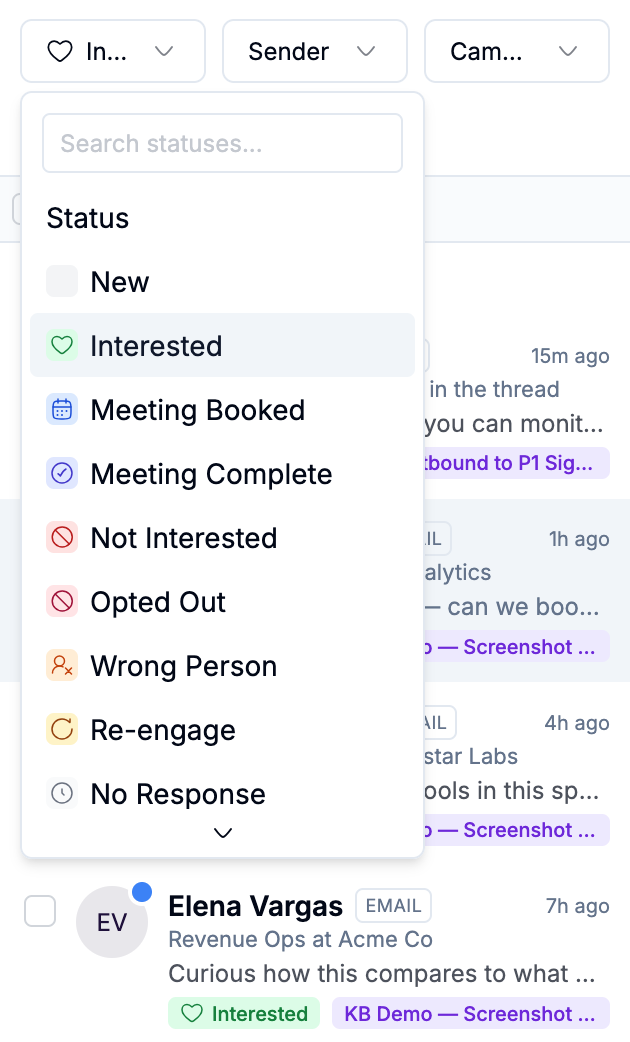
AI reply classification to help you prioritize
This is important because not all replies should be treated equally.
A simple "not interested" reply and a high-intent buying response do not deserve the same attention. The inbox helps you separate real demand from everything else.
Telling channels apart at a glance
Every thread in the inbox shows which channel it's on. Email threads carry an EMAIL badge, so you can tell them apart from LinkedIn conversations without opening anything.
One thing specific to email worth knowing: the mailbox label on a thread changes depending on its state. While you're still waiting on a reply, it reads From {mailbox}, since you sent it and nothing has come back yet. Once a reply arrives, it switches to To {mailbox}, since the mail is now addressed to that inbox. This is intentional, a quick visual cue for whether a thread still needs a response from the other side.
What you can do in the Unified Inbox
From the inbox, you can:
view all threads across connected senders and both channels
filter conversations by reply state
open a thread and review the full conversation
send replies from the correct sender account
send attachments (on email, this currently applies to replies and forwards, not automated sequence steps)
send voice notes (social)
review lead and campaign context in the details panel
update the lead status directly from the conversation
mark a contact opted out, on email threads, which adds them to your workspace opt-out list immediately and cancels anything pending
This makes the inbox the place where campaign-generated activity, from either channel, becomes real sales work.
Inbox filters help you work faster
The inbox is designed to help you focus, not just browse.
Depending on your workflow, you can use views like:
All
Unread
Answered
Unanswered
For email specifically, you'll also see Sent, Waiting (outbound sent, no reply yet) and Sent, Replies (outbound sent, reply received) as ways of scoping just your email activity.
These views are useful because they help you separate:
conversations that still need action
conversations already in motion
threads that deserve immediate follow-up
lower-priority activity you can review later
Best practice: Start with the conversations most likely to move pipeline, not the ones that arrived first.
AI reply classification helps prioritize demand
One of the most useful parts of the Unified Inbox is AI reply classification, and it runs the same way regardless of which channel a reply came in on.
Replies can be categorized into states such as:
Interested
Re-engage
Not interested
Wrong person
This gives you a faster way to understand what happened in the conversation without manually sorting every reply from scratch.
Why this matters
When campaigns are running well, volume increases. Classification helps your team spend time on the replies most likely to convert, instead of treating every reply as equal.
A good way to use it
Think of AI reply classification as a prioritization layer, not a replacement for judgment.
It helps you identify where to focus first:
Interested replies usually need immediate follow-up
Re-engage replies may need a softer or later response
Not interested replies usually do not need more sequence pressure
Wrong person replies help you redirect or clean up targeting
One email-specific case worth knowing: an out-of-office auto-reply is not treated as a real reply. It shows as its own status and pauses that lead's sequence rather than ending it, since the person hasn't actually responded yet.
The conversation view is where context pays off
When you open a thread, you are not just reading messages.
You are stepping into the output of the full system:
the Signal that identified the lead
the campaign flow that drove the outreach
the sender account that handled the touch
the reply that tells you what to do next
This is why context-aware outreach matters.
If the original campaign was built from the right Signal and the right context, the reply usually makes more sense, feels more natural, and is easier to continue, whether you're replying on LinkedIn or in someone's inbox.
Use the details panel to keep conversations grounded
The details panel gives you the operating context around a thread.
Depending on the conversation, this may include:
lead identity and profile context
campaign name
enrollment status
sender account
conversation timing
message count
current lead status
latest AI reply classification
This helps you answer practical questions quickly:
Which campaign generated this reply?
Which sender, or which mailbox, is handling it?
Is this lead already marked as interested?
Is this someone who should still be in-sequence?
Should this be handed to a rep now?
Lead status is how you turn replies into action
A reply matters most when it changes what should happen next.
That is why lead status should be updated as the conversation evolves.
Typical uses include marking someone as:
Interested
Meeting booked
Meeting complete
Not interested
Wrong person
Re-engage
This is important because the inbox is not just where replies are read. It is where next steps become clear.
Best practice: Update lead status as close to the conversation as possible. That keeps your team aligned and makes campaign outcomes easier to analyze later.
End campaign on reply keeps automation from getting in the way
If your campaign is set to stop when someone replies, the inbox becomes the handoff point between automation and human conversation.
That is the ideal motion for most outbound workflows, and it applies the same way whether the reply landed on LinkedIn or in an email thread.
That prevents a common problem in automation-heavy systems: the campaign continuing to send after a real conversation has already started.
Replying with the right format for the channel
Not every response should be typed the same way, and the channel shapes what's available.
On LinkedIn, the Unified Inbox supports standard typed replies, attachments, and voice notes.
On email, you get a full compose experience: To, Cc, and Bcc fields, rich text formatting, and the original message quoted below your reply. Attachments aren't supported on email replies or forwards yet; if you need to send a file, that's currently a job for your own mail client.
How to work the inbox in a Signal-first way
The best way to use the inbox is to keep the original Signal in mind.
Ask:
Why was this lead surfaced in the first place?
What did they post, comment on, or engage with?
What was the campaign trying to continue?
What does this reply tell me about urgency or fit?
That keeps the conversation anchored in real buyer context instead of turning it into generic follow-up.
A strong daily inbox workflow
A simple daily operating pattern looks like this:
Review Unread and Unanswered, across both channels
Prioritize threads classified as Interested
Check the details panel for campaign and status context
Reply from the right sender account, LinkedIn or email
Update lead status immediately
Revisit Re-engage and lower-priority threads after the high-intent replies are handled
This keeps the team focused on the work most likely to move deals.
Common mistakes to avoid
Treating every reply as equal. Not every response deserves the same urgency. Use classification and lead status to prioritize.
Ignoring the original Signal. If you reply without remembering why the lead was surfaced, the conversation can lose the relevance that made the outreach work in the first place.
Letting automation continue too long. If someone has already replied, on either channel, the inbox should take over. Do not let a live conversation compete with the sequence.
Failing to update lead status. If status changes live only in your head, the rest of the team loses visibility.
Confusing an out-of-office reply for a real one. An OOO pauses a sequence, it doesn't represent an actual response, so don't treat it as a signal to change your approach with that lead.
Using the inbox only as a message viewer. The inbox is not just for reading replies. It is the operating system for managing demand once outreach starts working, on whichever channel it comes in from.
Final advice
The Unified Inbox is where you find out whether your Signal-first strategy is creating real conversations.
Use it to focus on the replies with the most intent, respond with the right context, and move the best opportunities forward fast, regardless of which channel got you there.
That is how Signals, Campaigns, and AI personalization turn into actual pipeline.