Build a Signal-driven Campaign Flow
Learn how to build a campaign flow that starts with the Signal, keeps the full context attached to every action, and turns buyer intent into real conversations.
Written By Kevin Lawrie
Last updated About 1 month ago
A great campaign flow does more than automate outreach.
It turns a live Signal into the right next action while keeping the full context attached the entire way through, on whichever channel, or channels, actually get you the reply.
That is the core difference in getsignals. Most tools can put someone into a sequence. Very few can preserve why they were surfaced in the first place and use that context across engagement, invite notes, messages, emails, comments, and follow-ups.
Start with the Signal, not the list
In getsignals, campaigns work best when they start from a Signal.
That means you are not beginning with a static list of people who match a title or company filter. You are beginning with a real behavior that tells you something meaningful, such as:
a post that reveals a problem
a comment that signals buyer intent
engagement with a competitor post
a profile or page interaction that shows relevance
a job change or relationship signal
The Signal tells you why now.
Your campaign flow decides what to do next, and there's no single correct shape for that. The right flow depends on your use case, your audience, and which channels you've connected. What follows is a set of building blocks, not a formula to follow in order.
There's no fixed sequence here
It's easy to think of a campaign as a rigid pipeline: engage, then invite, then message, then email if that doesn't work. Some campaigns do look like that. Plenty of good ones don't.
You might skip pre-invite engagement entirely and go straight to an invite. You might run email and LinkedIn touches in parallel rather than one gating the other. You might have no invite step at all and run an Email only sequence built entirely around a Signal. None of these are lesser versions of some canonical flow. They're different tools for different situations.
The actions available to you break down roughly like this:
Engagement actions you can use before or around an invite, on Social only and Social + Email campaigns
The invite step itself, where the flow branches based on what happens
Actions for after someone's connected or already in dialogue
Actions for when LinkedIn hasn't worked, an invite ignored, a message unanswered
Send Email, available as its own linear sequence on Email only campaigns, or woven into any of the branches above on Social + Email
Use as much or as little of this as your situation calls for.
Why multiple channels actually help
There are two separate reasons a multichannel campaign outperforms a single-channel one, and they're easy to conflate.
Email is a real fallback, not a consolation prize. If someone doesn't accept your invite, or accepts but never replies, LinkedIn has effectively gone quiet. It doesn't mean the person isn't a fit, it just means that channel isn't landing right now. Email doesn't depend on an invite being accepted at all. On a Social + Email campaign, a lead who's gone cold on LinkedIn can still be reached, in full, through their inbox. This alone is a strong reason to run both channels together rather than picking one.
Prior visibility changes how a cold email is read. This is the less obvious one, and it's the more interesting one. If a lead has already seen you like their post, follow their profile, or leave a genuine comment on something they wrote, before your email ever arrives, that email isn't received the same way a fully cold message would be. Your name, and your company, already has some shape in their memory. That's not warm-up in the sense of some artificial pre-step required to unlock the real outreach. It's a deliberate use of a public, low-pressure channel to create recognition, so that when a message does land in their inbox, it's not arriving from a stranger.
That second point is why pre-invite engagement is worth thinking about even on campaigns where email is doing the real work of getting a reply. The engagement doesn't have to close the deal. It just has to make the email that follows feel like it's coming from someone the lead has some passing familiarity with.
Engagement actions before the invite
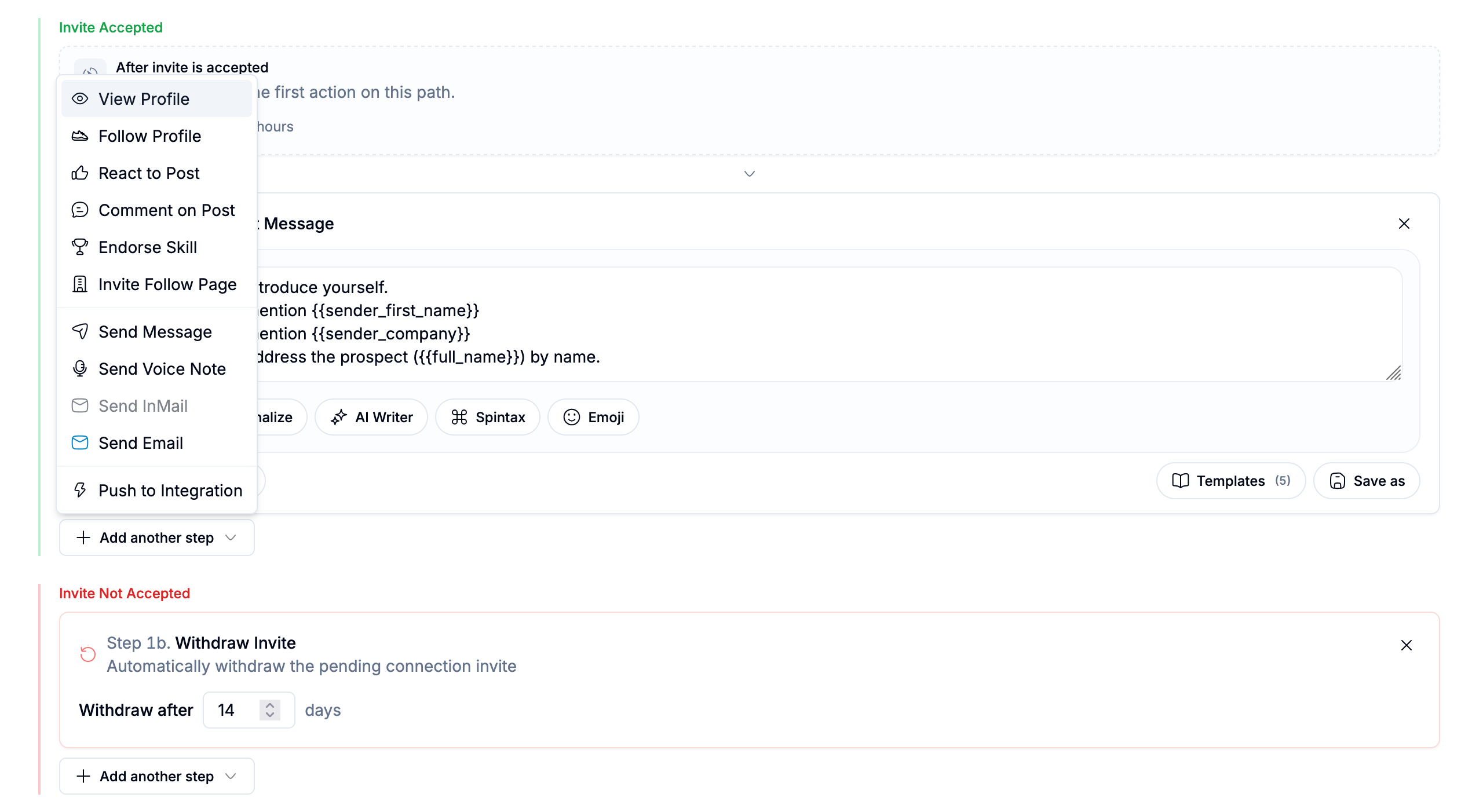
These are available to you on Social only and Social + Email campaigns, whenever you choose to use them:
View profile
Follow profile
React to post
Comment on post
Endorse skill
Invite to follow company page
Push to Integration
None of these are required, and none of them belong in every campaign. Use them when the goal is one of: building familiarity ahead of a message, putting your brand visibly in front of a wider audience than just the one lead, or routing the lead somewhere else entirely before you've committed to a social sequence.
Using engagement to build familiarity before outreach
One of the strongest Signal-first workflows starts with a post.
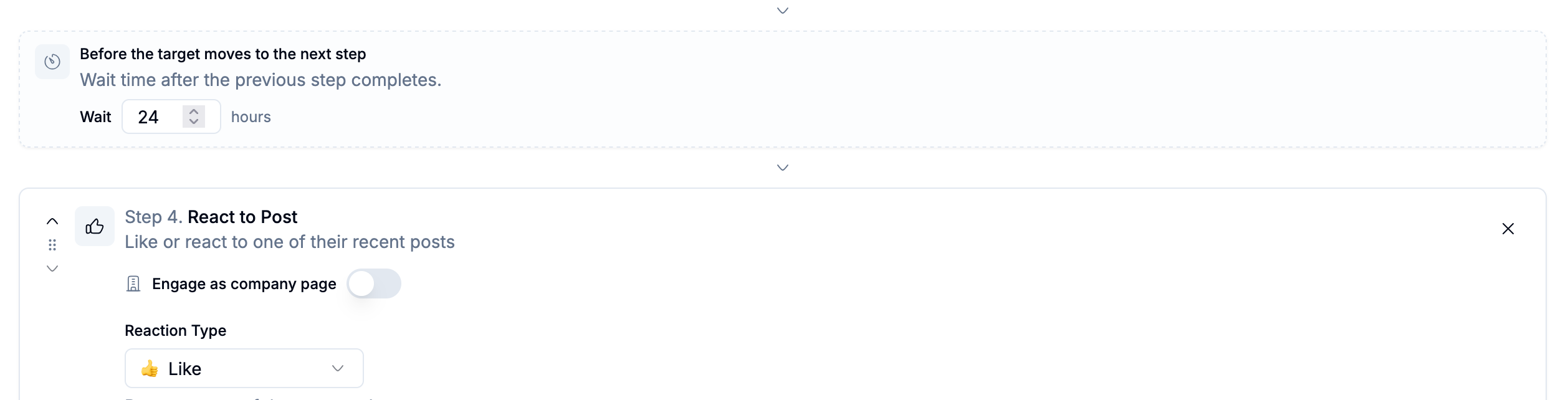
A Signal surfaces the post. Then you engage with that post before reaching out to the post author, people who reacted to it, or people who commented on it.
That sequence is powerful because the lead sees your presence before they see your direct outreach, whether that outreach ends up being an invite, a message, or an email later in the flow. Instead of appearing out of nowhere, your brand or sender has already shown up in the same conversation they were part of.
Reacting or commenting as a company page
When you react to or comment on a post, you can do it as a company page instead of as the individual sender.
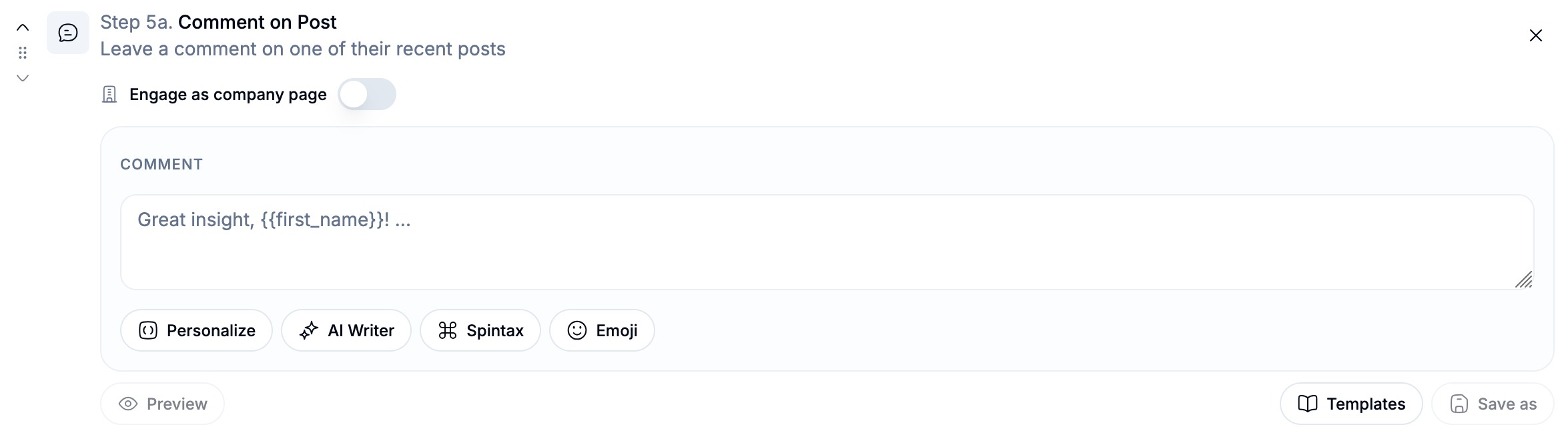
This is especially valuable because it increases visibility for your brand, not just for the individual sender. The post author sees your brand engage, other people engaging on the same post also see your brand, and your later outreach becomes more familiar by the time it lands, whether that's an invite, a LinkedIn message, or an email.
Because the comment happens in public, everyone following that thread is exposed to your brand in the comment section. That's brand visibility layered into your outreach motion, not just a touch aimed at one person.
AI-written comments should stay tied to the post
When using AI to write comments, the goal is not to generate a generic reply.
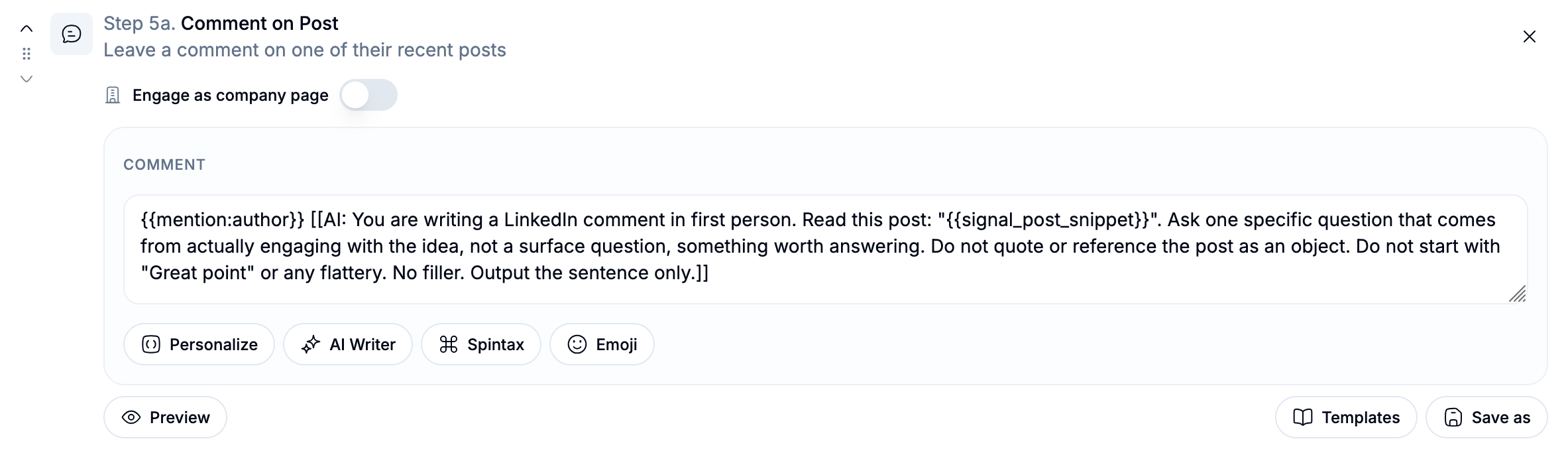
The goal is to write from the actual post content, the surrounding discussion, and the reason the lead was surfaced.
That is what makes the outreach feel connected instead of templated. A good Signal-first comment should feel like a real continuation of the conversation already happening on the post.
The invite step is a branching point, not a requirement
If your flow includes an invite, that's where things branch. At this point, the invite may be sent, the lead may already be a 1st-degree connection, the lead may accept and move into the next phase of the flow, or the lead may not accept.
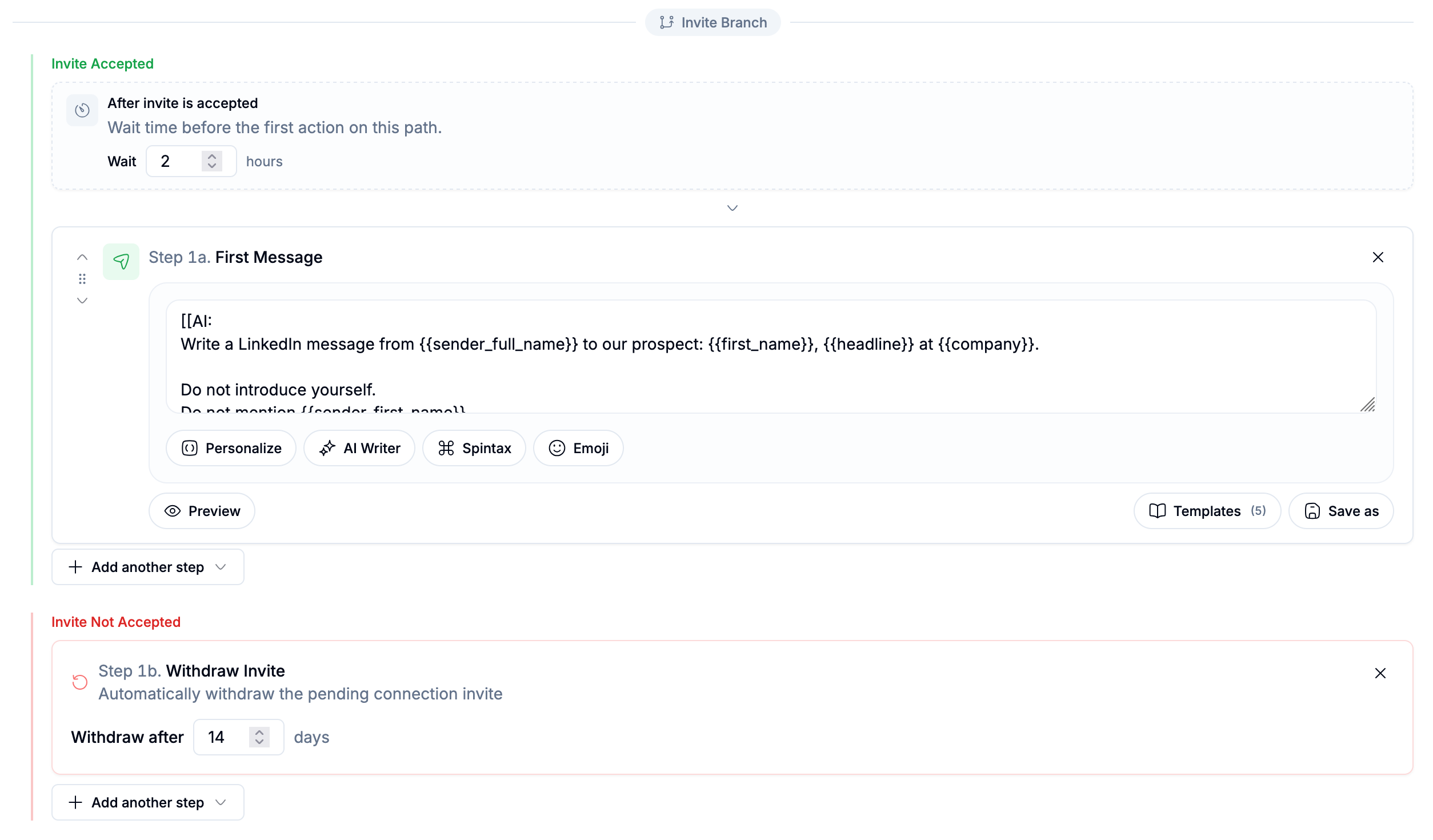
Email only campaigns skip this entirely. There's no invite to accept or not accept, so the flow is simply a sequence of Send Email steps, spaced out with delays.
Options that change how the flow behaves
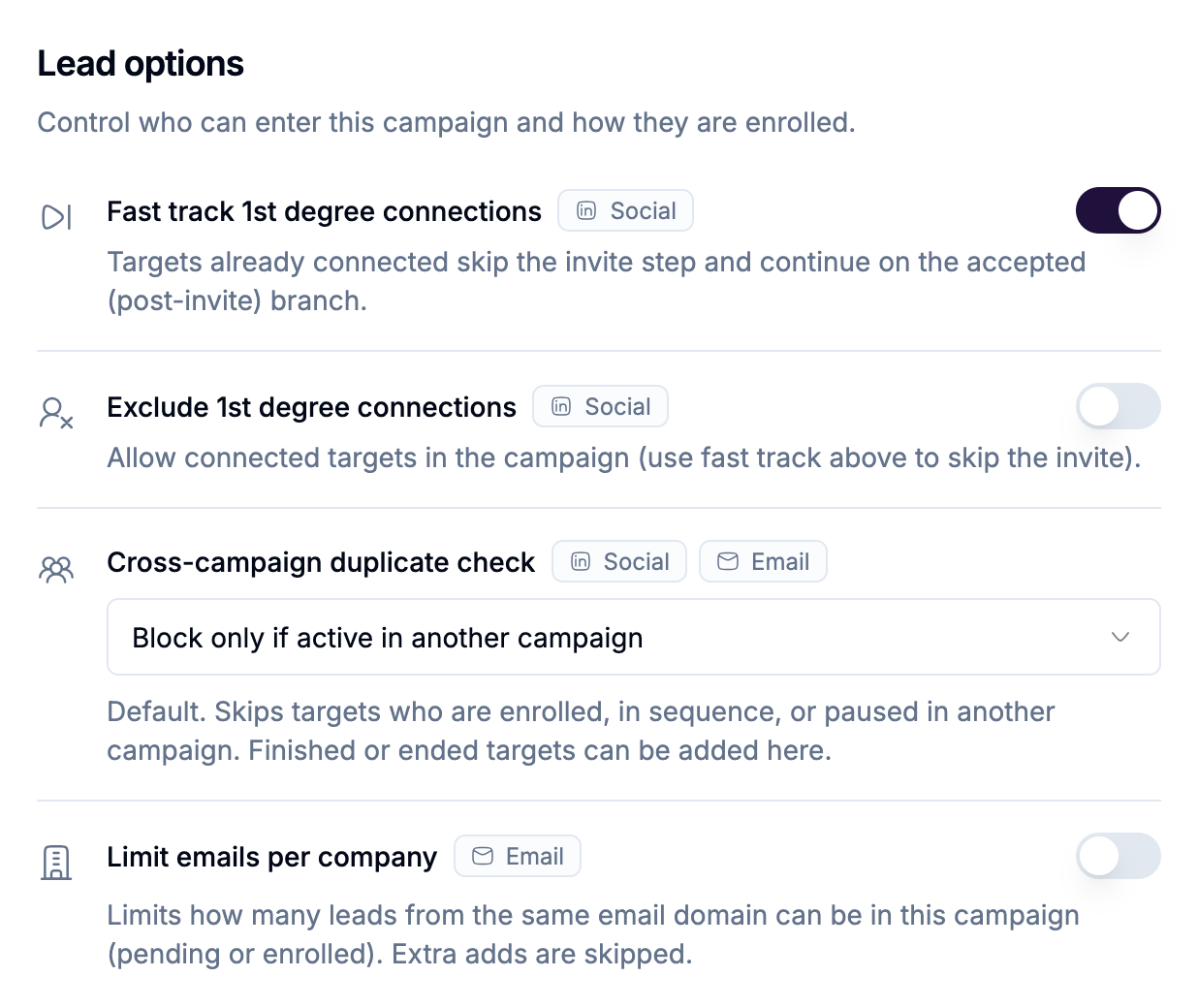
Fast track 1st-degree connections. If enabled, leads who are already connected skip the invite and continue directly.
Exclude 1st-degree connections. If enabled, leads who are already connected are removed from the campaign entirely.
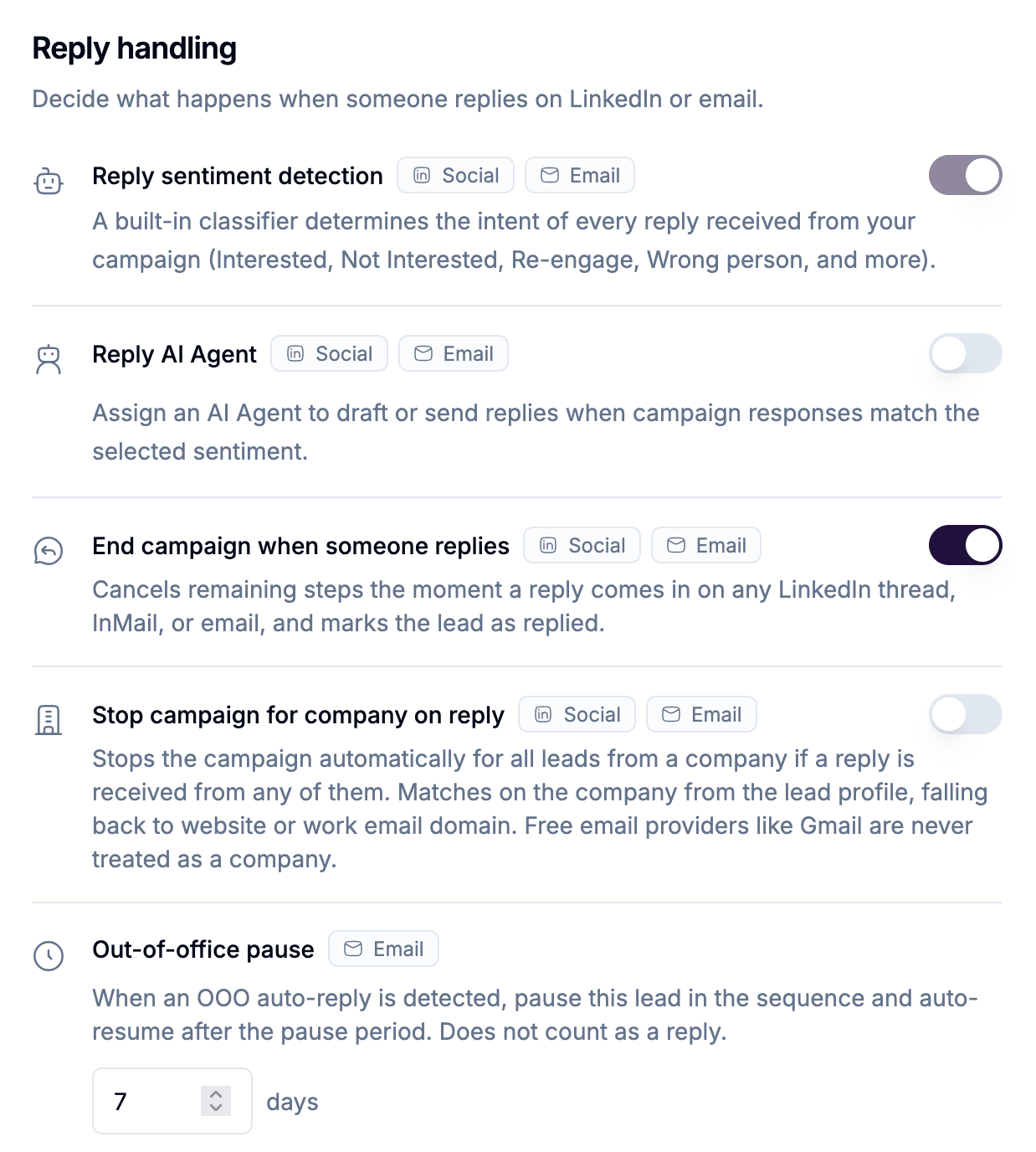
End campaign when someone replies. If enabled, the campaign stops remaining steps as soon as a reply comes in, on either channel if you're running Social + Email.
After connection, or after any engagement that's landed
Once someone's connected, or you're continuing a flow that doesn't depend on connection status at all, this is where you usually place direct messages, voice notes, premium messages, Send Email, follow-up steps, and Push to Integration.
The most important principle here is continuity. The message should not feel like a reset. It should feel like the next natural step after the Signal and whatever public engagement came before it.
That is why context-aware AI matters. Instead of writing from only a name, title, and company, it can write from the Signal that surfaced the lead, the post they wrote, the comments they made, their broader engagement history, and their profile and company context. That is how outreach feels like a conversation instead of a mail merge, whether the next touch is a LinkedIn message or an email.
On a Social + Email campaign, this is often where the paired mailbox does its work: a LinkedIn message shortly after connection, an email nurture touch later on, both from the same sender identity, so the lead experiences one consistent person across channels.
When LinkedIn hasn't worked
An invite that's gone unanswered, or a connection that's gone quiet, doesn't have to be the end of the flow.
This is where invite cleanup often lives, withdrawing stale pending invites after a set period, and it's also exactly where email earns its keep. Send Email here reaches a lead who LinkedIn hasn't been able to reach, through a channel that never depended on the invite being accepted in the first place. A premium message or a Push to Integration step can also live here, depending on what makes sense for that lead.
The point is that this branch should have a clear outcome. A lead who hasn't responded on LinkedIn shouldn't just sit unresolved. Give the flow somewhere to go.
Recommended Signal-first campaign patterns
These are starting points, not rules. Mix, skip, or reorder pieces based on your own use case.
Pattern 1: Signal post, engage, then invite
Signal surfaces a relevant post. React to it, comment on it, send the invite, then continue with a context-aware follow-up if accepted.
This works especially well when timing matters and the post itself is the strongest context.
Pattern 2: Company-page visibility, then outreach
Signal surfaces a relevant post. React and comment as a company page, then reach out to the post author or other engaged people afterward.
This is powerful because the brand becomes visible before the private outreach begins, and stays visible to everyone else following that thread too.
Pattern 3: Buyer intent, fast handoff
Signal surfaces a strong buying signal. Push to Integration immediately, routing the lead into a complementary channel while the timing is still live.
Useful when social is the signal layer and another channel is the conversion layer.
Pattern 4: Existing relationship, no invite needed
Signal surfaces someone already in your network. Fast track the connection, skip the invite, and continue with a message that references the Signal context directly.
Pattern 5: LinkedIn first, email as the safety net
Light engagement, then an invite. On accepted, a LinkedIn message. On not accepted, or on accepted-but-silent, an email reaches the person anyway, arriving with at least some prior visibility already established.
This is the pattern that gets the most value out of running both channels together: LinkedIn does what it's good at when it works, and email closes the gap when it doesn't.
Pattern 6: Email-only, no LinkedIn dependency
Signal surfaces a relevant post, comment, or job change, with a verified email available. A short, linear sequence of two to three Send Email steps, no invite, no LinkedIn dependency at all.
The right choice when you don't need or want a LinkedIn touch, or the lead doesn't have an active LinkedIn presence to work with.
Common mistakes to avoid
Treating pre-invite engagement as a required phase. It's a set of optional tools for building familiarity, adding visibility, or routing intelligently. If none of those apply, skip it.
Losing the Signal context in later steps. If your follow-up messages, on either channel, stop referencing the reason the lead was surfaced, the campaign loses its biggest advantage.
Using AI without real context. AI should write from the prospect's actual posts, comments, engagement, and Signal history. Otherwise it becomes generic personalization.
Ignoring public brand visibility. When you comment as a company page, that action is visible to more than just the lead. It shapes how your brand shows up in the conversation.
Treating email as an afterthought rather than a fallback with real reach. A lead who's gone quiet on LinkedIn is not a dead end if you have email connected. Build your flow so that silence on one channel isn't the end of the story.
Stacking a message and an email in the same minute. On Social + Email, space your channels out deliberately. A LinkedIn message and an email landing within seconds of each other doesn't read as natural pacing on either side.
Final advice
The best campaign flows do not start with "What sequence should I build?"
They start with: What Signal surfaced this person, and what is the smartest next action, on the smartest channel, because of that?
That is the mindset to use in getsignals.
Start with the Signal. Use public engagement when it genuinely builds familiarity or visibility, not because a formula says to. Keep the context attached all the way through, whether the next touch is a comment, a message, or an email. And treat every connected channel as a real path to a reply, not a fallback you only reach for once the "main" channel has failed.