AI Personalization for Campaigns (Email, Invites, DMs, Comments or InMail)
Learn how getsignals writes from the Signal that surfaced the lead, which variables work best in Notes, Messages, InMail, and Comments, and how to use comment-thread context, mentions, Spintax, and the AI Research Brief together.
Written By Kevin Lawrie
Last updated About 1 month ago
Most outreach tools personalize from a business card.
They know a lead's name, title, company, maybe industry. Sometimes a headline. That is not real context. That is identity data.
getsignals works differently.
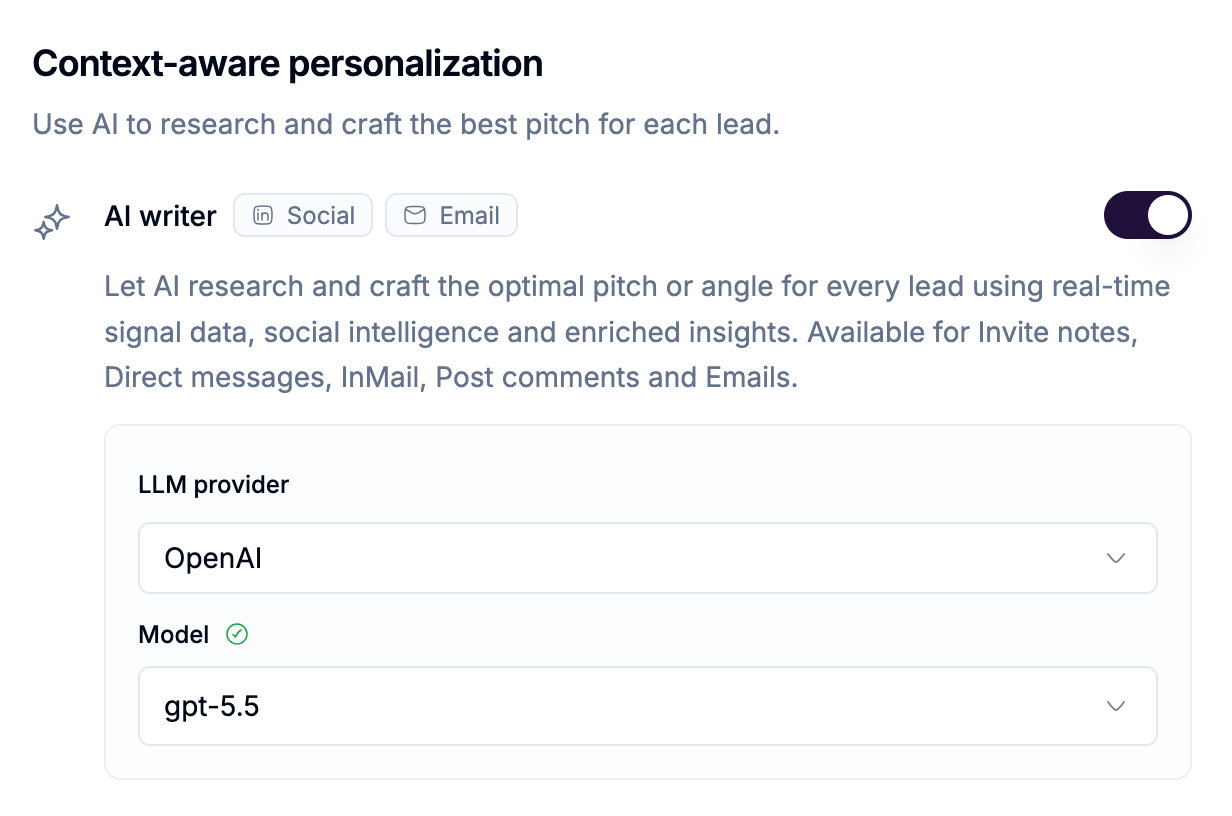
Our AI Personalization is built around the full context of why the lead was surfaced in the first place and what that person is actually saying, posting, commenting on, and engaging with, and it works the same way whether the message lands as a LinkedIn touch or an email.
What makes AI Personalization different in getsignals
In getsignals, personalization is not just about filling in {{first_name}}.
It is about carrying the full context of the lead into every action, including:
the Signal that surfaced them
the post or comment that put them on your radar
their recent posts
the posts they have commented on
the full signal post
the saved comment thread on that post
their LinkedIn profile context
their company context
the sender context
your own workspace firmographics
That means outreach can be written from what they are thinking, what they are reacting to, what problem they seem to be experiencing, and what kind of timing signal they are giving off.
That is very different from generic AI outreach.
Think of personalization as 4 layers
In getsignals, campaign copy usually comes from four layers:
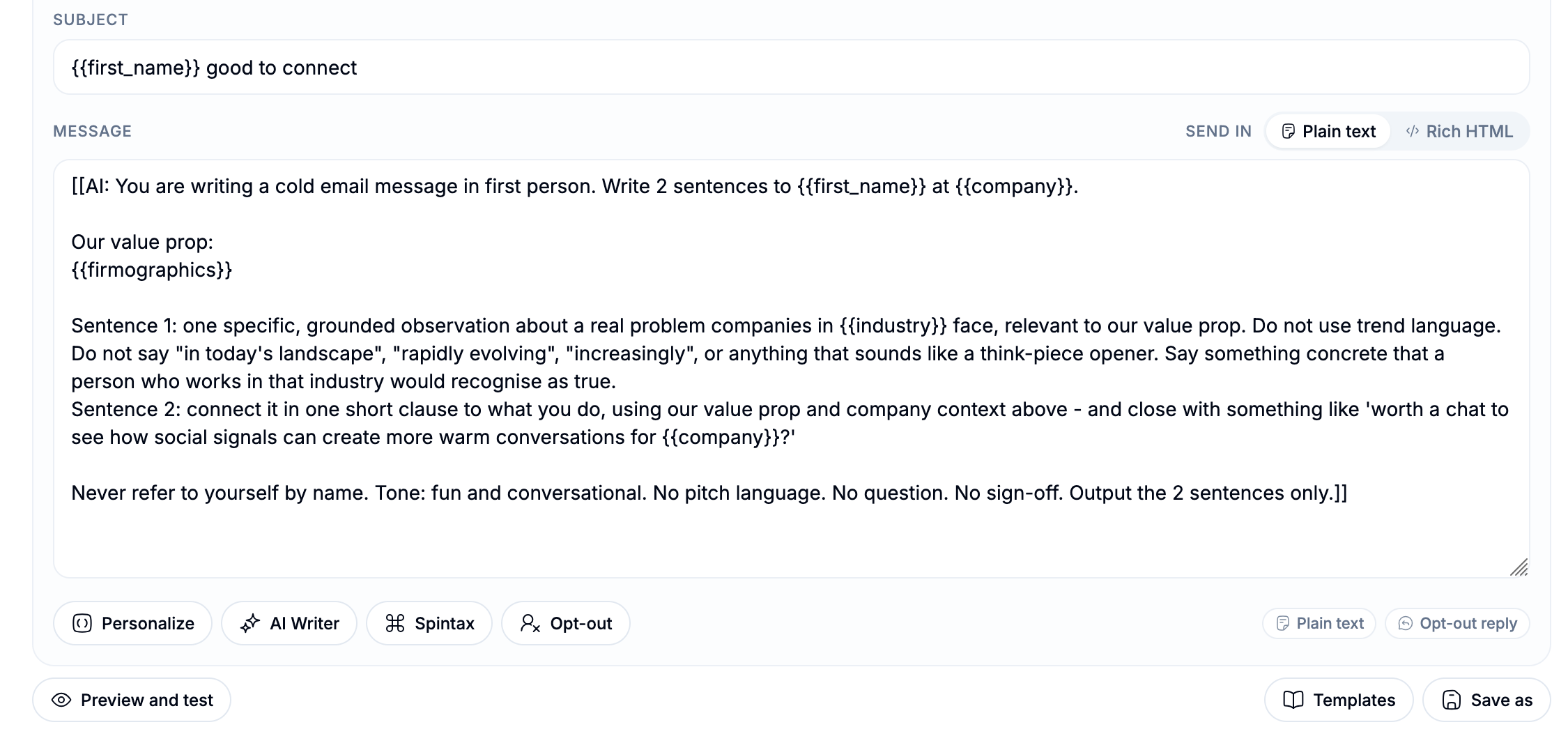
1. Merge variables. These are the {{...}} values that fill in real data from the lead, Signal, sender, workspace, or campaign. Example: {{first_name}}, {{company}}, {{signal_post_snippet}}, {{target_comment_history}}, {{list_post_comments}}, {{mailbox_signature}}.
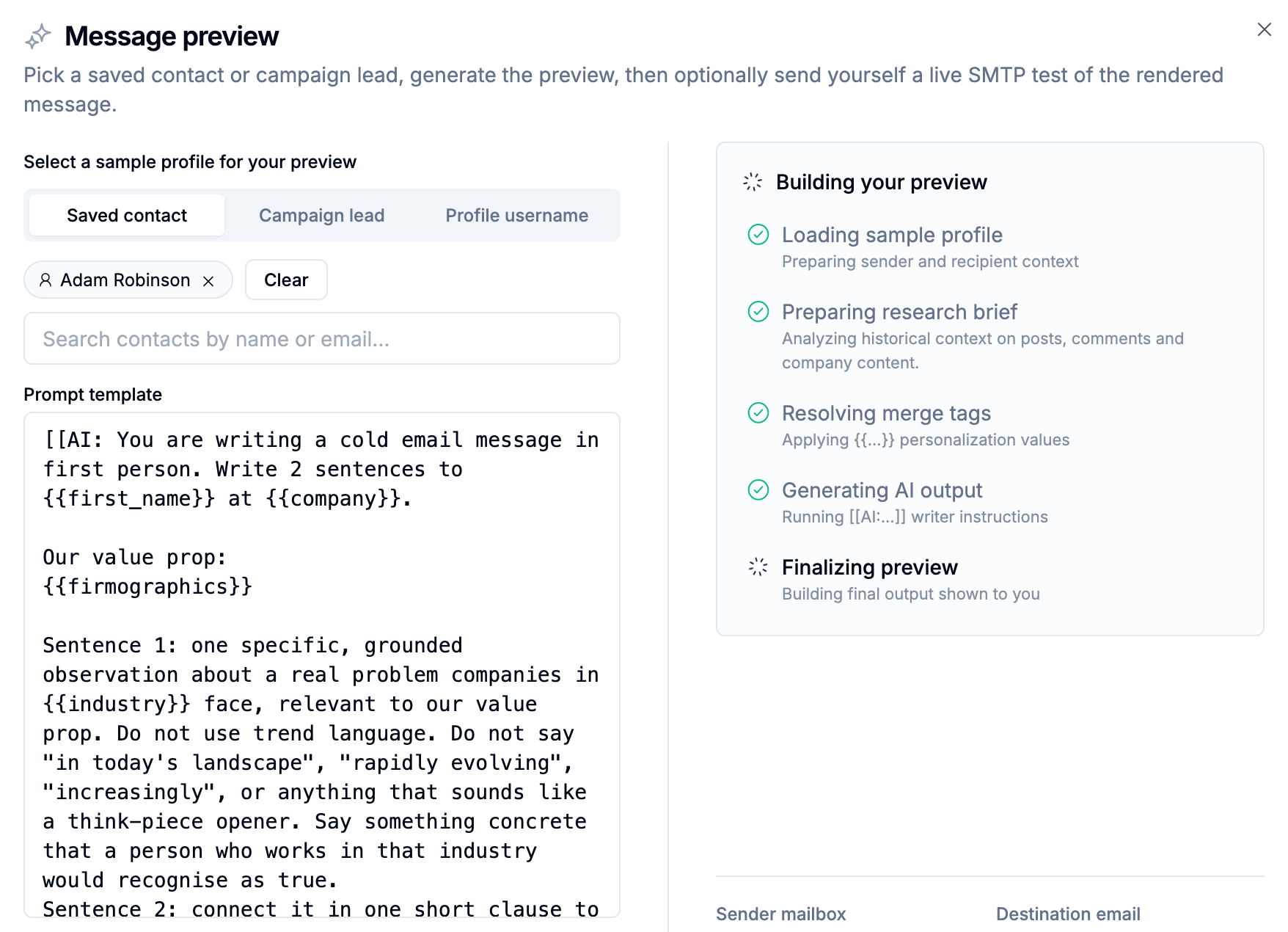
2. AI Writer. These are [[AI:...]] instructions that tell the model how to write based on the context available. This is where getsignals becomes much more powerful than simple merge-field personalization.
3. Mentions. These are special mention tags such as {{mention:author}} and company page mention variants. Mentions matter most in comments, where the goal is to join a live public conversation naturally. Email has no equivalent, since an email isn't a public thread someone else is reading.
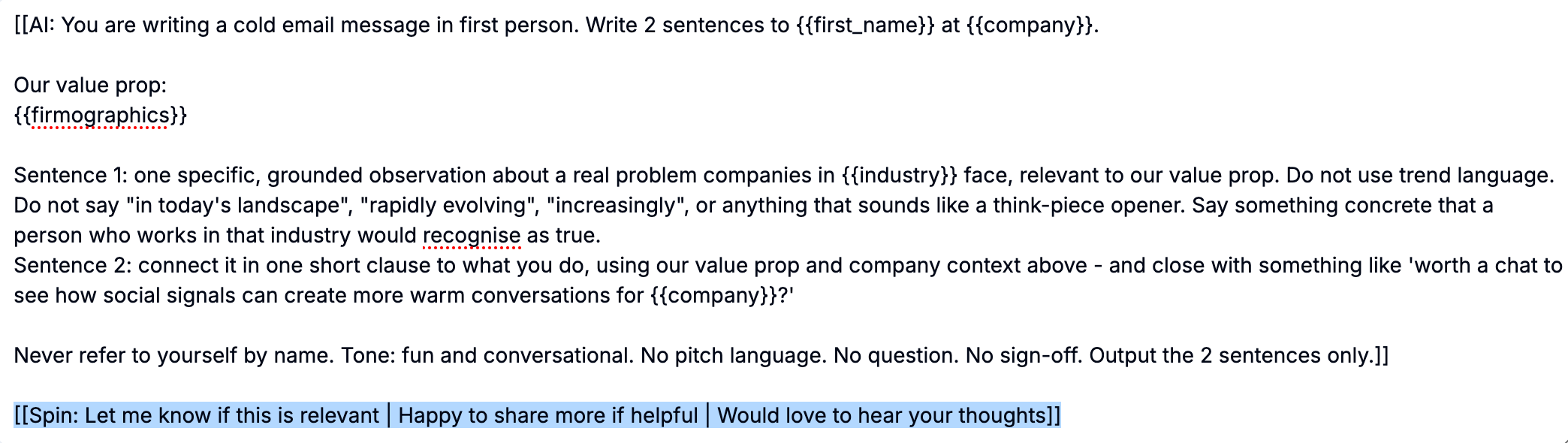
4. Spintax. This is controlled variation using [[Spin: option A | option B | option C]]. Spintax helps create small copy variations. It does not replace context. It should support the message, not define it.
What context AI can use
Depending on the step, AI can work from:
Lead identity and profile context: first name, full name, company, title, headline, location, industry.
Signal context: signal name, post snippet, full post text, post URL, topic, keyword, post reaction count, post comment count, post repost count, the lead's own comment on the signal post, the post author's name and headline, the saved list of comments on the signal post.
Social intelligence and context: the lead's recent posts, the posts the lead has commented on, recent posts from the lead's company page, a structured prospect research brief generated for AI.
Sender and campaign context: sender name, sender company, sender title, campaign name, workspace firmographics, and for email, the connected mailbox's signature.
This is what allows the AI to write from real buyer intelligence instead of generic profile data, on any channel.
Variable availability depends on the step
This part matters.
The same broad context system powers the campaign, but different steps are better suited to different kinds of variables. There are now five copy surfaces to think about: Connection Notes, Messages, InMail, Comments, and Email.
Connection Notes
Connection notes are the most constrained copy surface.
They are short, high-pressure, and should stay focused.
Best-fit variables for notes: {{first_name}}, {{company}}, {{title}}, {{headline}}, {{signal_post_snippet}}, {{post_topic}}.
Best use of AI in notes: AI works well here when you want one short, natural sentence written from a post idea, a headline, a role/company combination, or the specific Signal context.
Important limitation: Connection notes have a 300-character limit after merge and AI output. That means you should treat notes as a compact personalization surface, not a place for long research-heavy prompts.
Best practice: For notes, use the Signal to create relevance, not to cram in detail.
Messages
Messages are the richest standard copy surface in the campaign builder.
This is usually where the full getsignals methodology shines the most.
Best-fit variables for messages: lead identity variables, Signal variables, sender variables, workspace firmographics, and social intelligence variables like {{target_post_history}}, {{target_comment_history}}, {{company_post_history}}, {{prospect_analysis_brief_json}}.
Why messages matter most: Messages give AI enough space to actually reason with the Signal and continue the same thread. This is where you can go beyond "Saw your role at X" and instead write from what they posted, what they said in comments, the pattern in their recent activity, or the problem signal that surfaced them.
Best practice: If your Signal is strong, the first message should feel like a continuation of the same context, not a fresh cold open.
InMail
InMail has two separate personalization surfaces: subject line and message body. That distinction matters.
InMail subject line. Supports merge variables and spintax. AI Writer is not allowed in the subject line. That means the subject should stay simple, human, and direct. Best-fit variables: {{first_name}}, {{company}}, other short identity/context tags when useful.
InMail message body. Works much more like a standard message. Supports merge variables, AI Writer, and spintax. This is where you can use richer Signal context and deeper AI prompting.
Best practice: Keep the subject line tight and let the body carry the real context.
Email works almost identically to InMail: a subject line and a message body, each with its own rules.
Email subject line. Supports merge variables and spintax, the same as InMail. AI Writer is not available here either, so write your subject directly and test it, rather than expecting AI to generate it.
Email message body. Supports merge variables, AI Writer, spintax, and {{mailbox_signature}} to insert your connected mailbox's signature. This surface can carry the same depth as a Message or InMail body, including the AI Research Brief. See [Use the AI Research Brief for Deeper Personalization].
Why personalization matters more here, not less. Unlike LinkedIn, where personalization is primarily about relevance, email personalization also does deliverability work. Identical templated emails sent at volume are one of the easiest patterns for spam filters to catch. Spintax and AI writer blocks mean no two recipients get the exact same wording, which is part of what keeps a message reading as human rather than mass-sent. Personalize your email steps even when you might be tempted to keep a message static for consistency.
A note on what email doesn't support. Mentions have no place in email, since there's no public thread to tag anyone into. And unlike replying manually from the Unified Inbox, sequence email steps don't support attachments or Cc/Bcc; keep those in mind as you plan what a step needs to accomplish.
Best practice: Treat your email subject the way you'd treat an InMail subject, short, plain, and human, and let the body do the work of connecting to the Signal.
Comments
Comments are different from every other surface because they are post-centric.
A note, message, InMail, or email is mainly about the lead. A comment is about entering an existing public conversation with the right context and the right angle.
That makes comment quality heavily dependent on what the system can understand about the post itself, the author, and what other people are saying in the thread.
Best-fit variables for comments: {{mention:author}}, company page mention variants, {{signal_post_snippet}}, {{signal_post_full}}, {{post_topic}}, {{post_author_first_name}}, {{post_author_full_name}}, {{post_author_headline}}, {{contact_post_comment}} when the lead came from comment context, {{list_post_comments}}, {{signal.post_comments_list}}.
Why {{signal_post_full}} matters: This gives the writer the full post, not just a short excerpt. That matters when the AI needs to understand the full argument, the nuance of the author's point, or the angle worth responding to. For comments, this is often more useful than a short snippet because a public response needs to feel grounded in the actual post.
Why {{list_post_comments}} matters: This is one of the most important context tags for AI-written comments. It gives the writer the saved list of comments from the same signal post, so the model can understand not just what the author said, but also how the discussion is developing and what other people are reacting to.
When you combine {{signal_post_full}} and {{list_post_comments}}, the AI can read both the original post and the surrounding discussion. That gives it much stronger context to choose the right angle for the comment, instead of producing a generic reply.
How mention tags work in comments. {{mention:author}} mentions the author of the post you are commenting on, helping the comment feel native and clearly directed. Company page mention tags tag one of your own pages in the comment, adding brand visibility while staying tied to the original discussion. That means comments can do two things at once: engage the author directly, and expose your brand more visibly in the public conversation.
Best practice for comment generation. Read the full post, read the saved comment thread, decide the angle, mention the author when appropriate, tag your own page when added visibility helps, then write one strong, native comment. That is what makes comment automation feel credible instead of templated.
Best practice: Comments should feel like real participation in the thread, not mini DMs pasted into a public conversation.
Special note: the AI Research Brief
Some of the strongest AI personalization in getsignals uses a two-step process.
When you place {{prospect_analysis_brief_json}} inside an [[AI:...]] block, the system does not treat it like a normal merge tag.
Instead, it works like this: a server-side research step compiles a structured brief, then the writer step uses that brief to generate the final output, whether that output is a message, an InMail body, or an email body.
That research brief can pull together the Signal that surfaced the lead, the lead's LinkedIn profile context, their recent posts, the posts they commented on, what they said in those comments, their company context, sender context, and workspace firmographics.
This is important because it lets AI reason before it writes. See [Use the AI Research Brief for Deeper Personalization] for the full breakdown.
Use AI for meaning, not just decoration
The best AI prompts in getsignals do not ask the model to "make this sound personalized."
They ask it to understand the Signal, read the post or comment context, infer what the buyer actually cares about, and continue that thread naturally.
That is what separates context-aware outreach from generic AI copy.
Good AI use cases: writing a note from the idea in a signal post, writing a message or email from the lead's post/comment history, writing a comment that responds to the post itself and the comment thread, writing a follow-up that still reflects the original Signal, writing from the AI Research Brief when deeper reasoning matters most.
Weak AI use cases: rewriting generic outreach without real context, stuffing too many facts into a note, using AI when a simple merge field would do the job, asking AI to sound personalized when the source context is thin.
Use spintax for controlled variation
Spintax is useful, but it should play a supporting role.
Format: [[Spin: option A | option B | option C]]. One option is selected at send time.
Where spintax works well: opening lines, transition phrases, soft closes, light subject-line variation (on InMail and email subjects, where AI writer isn't available), small phrasing differences in notes, messages, InMail body, email body, or comments.
Where spintax should not lead: Do not use spintax as a substitute for context. Spintax creates variation. Signals create relevance.
The strongest combination is Signal for timing and context, variables for factual grounding, AI for reasoning and message generation, and spintax for light controlled variation.
Important rule: Do not nest spintax inside AI blocks or AI inside spintax blocks. Keep them separate.
How to choose between variables, AI, mentions, and spintax
Use plain variables when you just need factual insertion, the message is already strong without generation, or you want tight control over the final wording.
Use AI when the message should respond to what the lead actually said, you want the Signal context to shape the copy, or you need nuance, interpretation, or angle selection.
Use mentions when you are commenting on a post and want to mention the author directly, or you want to tag your own company page for added visibility, or you want the comment to feel native to the thread rather than detached from it.
Use spintax when you want light variation in otherwise stable copy, you want repeated steps to feel less repetitive, or you want to vary subject lines, openings, or closes without changing the message strategy.
The strongest pattern in getsignals
The strongest campaigns usually follow this structure:
A Signal surfaces the lead. Warm-up engages on that Signal context, where the channel supports it. AI writes from the original Signal and broader buyer intelligence. Comments use full post plus thread context, with mentions when useful. Follow-up messages and emails continue the same thread. Spintax adds small controlled variation around the edges. The AI Research Brief deepens reasoning for richer direct-response steps, on any channel.
That is how personalization stays coherent from the first touch through the inbox, no matter which channel carries which step.
Common mistakes to avoid
Treating AI as a fancier merge field. AI should reason from context, not just restate profile facts.
Using the same prompt style for every step. Notes, messages, InMail, email, and comments are different surfaces. They need different prompt shapes and different variables.
Overloading connection notes. Notes should be tight. Do not try to force deep research into a 300-character space.
Writing comments like private outreach. Comments are public, post-centric, and should feel native to the thread.
Forgetting thread context on comments. If you use {{signal_post_full}} without {{list_post_comments}}, the AI sees the post but not the surrounding discussion. That can weaken the angle.
Ignoring mention strategy. {{mention:author}} is for mentioning the author of the post you are commenting on. Company page mention tags let you tag your own page to add brand visibility. Both should be used intentionally.
Relying on spintax instead of context. Variation is helpful, but it does not create relevance on its own.
Sending identical email copy at volume because it feels safer. With email specifically, sameness is a deliverability risk, not just a missed personalization opportunity. Lean on spintax and AI writer here even more than you might on LinkedIn.
Final advice
If you remember one thing, make it this: the Signal is the reason the message should exist.
Everything else supports that: variables ground it, comments add thread context, mentions shape public visibility, AI interprets it, the research brief deepens it, spintax varies it, and your choice of channel decides how it reaches the buyer.
That is why getsignals personalization feels different.
It is not writing from who the buyer is on paper.
It is writing from what the buyer is actually saying, thinking, and signaling in public, and delivering it wherever they're most likely to notice and reply.