How it works
Written By Kevin Lawrie
Last updated 2 days ago
What:
Most GTM teams have to choose between two ways of finding buyers. Signal capture watches the noise in real time and filters for relevance as it comes in, which is powerful when you don't yet know who you're looking for. ICP Signal Search works the other direction: you already know exactly who you want, so we start there and go find the signal.
Think of signal capture like a net in open water. You're not wrong to cast it, real fish swim into it. But a net doesn't only catch fish, it catches everything else moving through the water too, and most of what comes up has to get thrown back. That's not a flaw in the design, that's the design working. The problem is it doesn't feel that way when you're the one paying for every pull of the net. Watching credits go toward catches you'll never use feels like a loss, even when the alternative, keeping the noise, would be worse.
Compare that to buying a static list. Every row feels like something you can hold, a name, a title, a company. It doesn't matter that the person left that role eighteen months ago, or that they've never once shown a flicker of interest in the problem you solve. You still walk away feeling like you got 100% of what you paid for, even though most of it is dead weight the moment you download it.
ICP Signal Search skips the net entirely. You tell us the role, industry, and location, all in natural language, no fixed dropdowns or rigid taxonomy to work around. We go find exactly the people who match, then build the signal story around each one: what they're posting, what they're saying in the comments, what their company is doing right now, whether they're actively hiring for roles that matter. It's the same research a sharp rep would spend two or three hours assembling by hand, done automatically and delivered clean.
Who:
This is built for the searches that don't fit the way social engagement naturally works. If you're only allowed to sell into three states, or one metro area, signal capture can't respect that boundary, it would have to filter out thousands of people after the fact just to find the handful in your territory. If your buyer is "Marketing Leadership" or "Sales Leadership," that's not one title, it's dozens of variations, and chasing all of them through engagement data means wading through far more noise before you find the fit. And if your ICP isn't a clean industry at all, it's something like SaaS companies, or specifically Y Combinator-backed startups, there's no dropdown built for that. ICP Signal Search handles all three, because it starts from the definition you actually have, not the categories a list tool assumes you should have.
A static list gives you a row in a spreadsheet with no sense of timing and no idea if the person cares. We score every lead's Signal Strength against your actual firmographics, your ICP, your value proposition, and the pain points you solve, automatically, for every match. Not a name you hope is still relevant. A reason to reach out, attached to every contact, the moment it lands.
How:
Underneath all of it is the same social signal network already running for every getsignals customer, ingesting thousands and thousands of posts and comments every single day. That's a genuinely massive haystack. Most of the time, our job is finding the needle inside it for you automatically. ICP Signal Search takes a different approach: it opens that entire haystack up and lets you query it directly with your own ICP, so instead of waiting for a needle to surface, you go in and pull out exactly the ones that match.
What makes it different from traditional list building:
Every lead is observed by our signal capture network. This is not a static database.
De-duplication is built-in, so you never pay twice.
Our Stacked Signal Intelligence delivers actionable intelligence based on what a lead or account is posting, reading, commenting and thinking. Whether your account signal is fundraising, a key hire or a new product launch - we’ll surface it.
Stack Signal Intelligence scores problem-awareness and writes research as custom properties you can filter, export, and use in outreach.
Open job roles and hiring to watch checks real job postings, not just social chatter, to confirm a company is actively hiring for roles you care about.
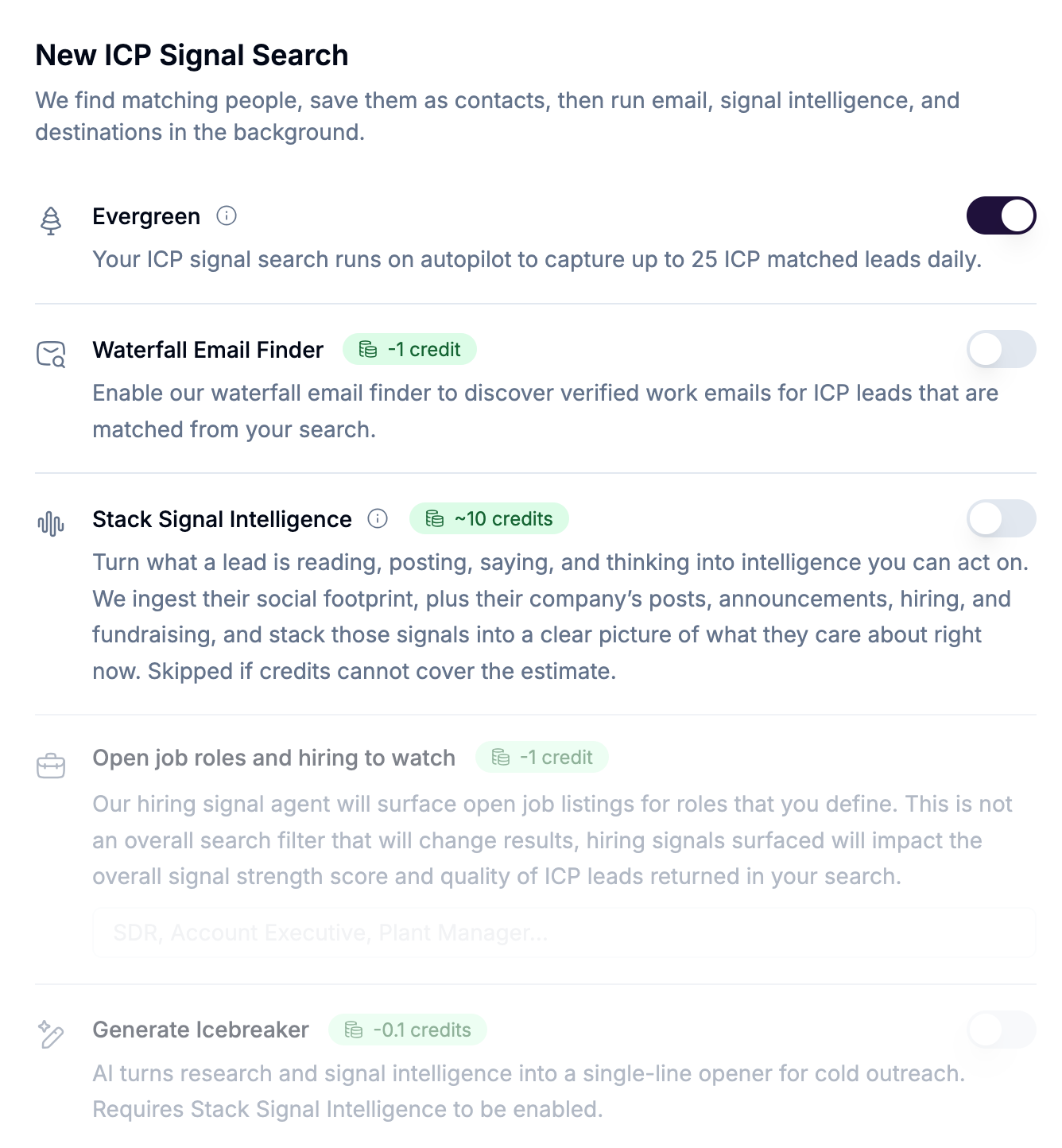
Evergreen runs daily on autopilot and rotates the search so you're not asking the same question every day. ICP Signal Searches are ‘set it and forget it’ right out of the box.
Sync with getsignals Campaign sequences or push to your existing outbound stack or CRM automatically, including outbound AI Icebreakers.
Setting up a search
Open ICP Signal Search in the sidebar (
/icp-search).Click New search (or Create a search on the empty state).
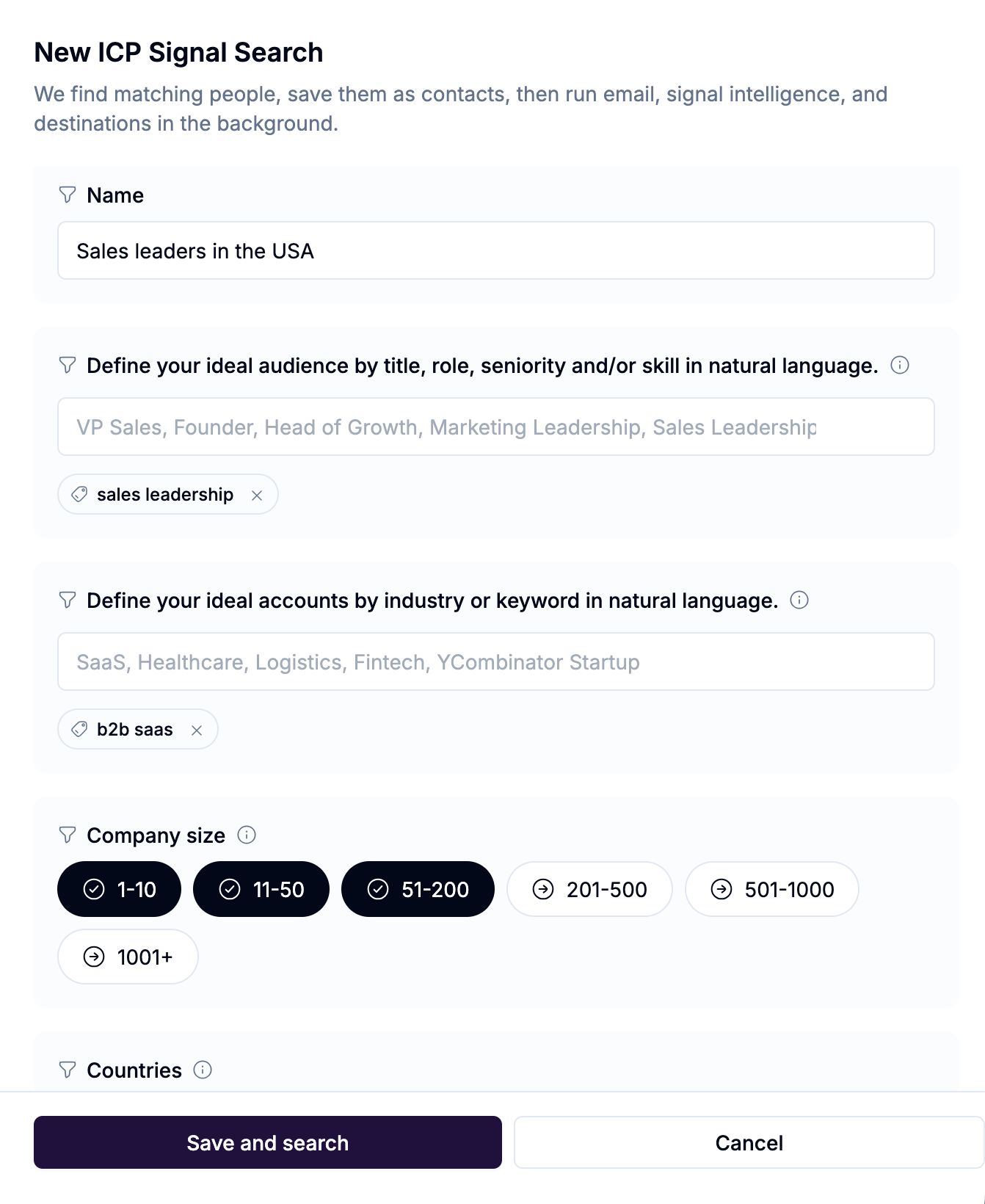
Fill Name and Define your ideal audience (at least one title). Add industries, company sizes, and location as needed.
Choose Max number of ICP leads per search (10 / 25 / 50 / 100). Default is 25.
Leave Evergreen on for daily autopilot, or turn it off for a one-time run.
Optionally enable Waterfall Email Finder, Open job roles and hiring to watch, Stack Signal Intelligence, and Generate Icebreaker.
Optionally Enroll in Campaign Sequence and/or open Integrations to sync to Sheets, CRMs, and sequencers.
Click Save and search.
Configuring an existing search
On the list, click the edit pencil icon.
Change audience, daily cap, Evergreen, email, hiring roles to watch, stacking, icebreaker, campaign, or integrations.
Click Save. If the search is live or in an error state, we run it again after save.
Changing titles, countries, states, cities, technologies, or company sizes restarts geographic rotation from the first slice.
Viewing leads that are discovered

Click the Leads found value
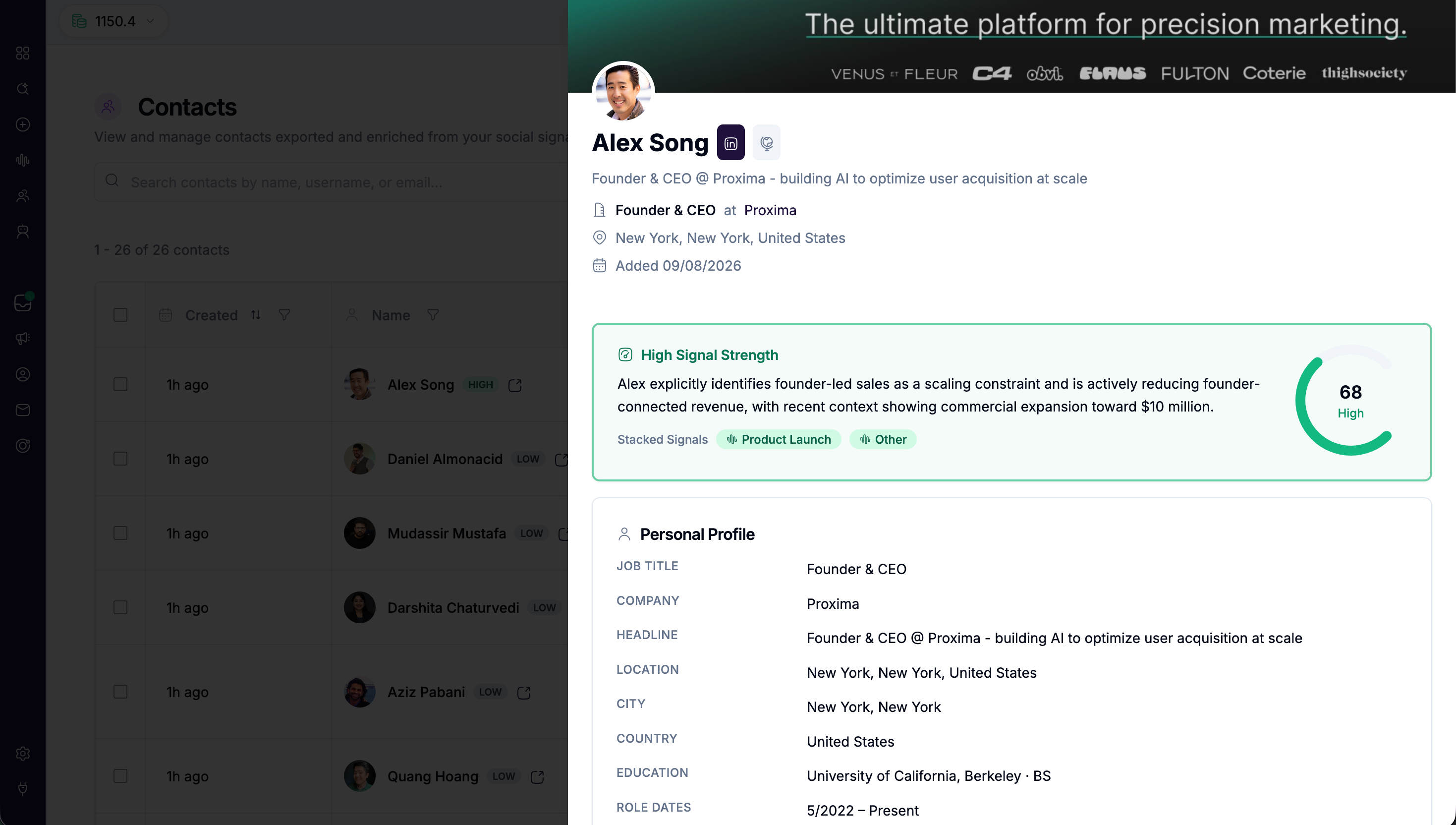
Open a contact. After stacking finishes you will see:
A Signal Strength card (High / Medium / Low + rationale)
Signal Intelligence and Research on the profile (all stacking properties)
Standard contact fields (name, title, company, email, location, and more)
If Google Sheets is enabled, you can expand Runs or the Google Sheets section and open the latest spreadsheet or see the full history of spreadsheets generated.
Search options
The form shows how many unique daily lookups your chips create. Evergreen rotates one combination per day.
Enrichment
Stacking credit ceiling per lead: person's posts, comments, company posts, firmographics, AI analysis.
A note on hiring signals: turning this on doesn't filter your search results down to only companies that are hiring. It's a research layer, not a gate. What it does is check real job postings for the roles you list, and if a match is found, that evidence gets folded into the lead's Signal Strength score and rationale. A company actively posting for an Account Executive role is a stronger buying signal than one that isn't, and this is how that gets reflected in what you see.
Signal strength gates (only when stacking is on)
Scoring does not change credits. You can configure integration sync for outbound platforms or your CRM based on the strength of the signal (Medium to High).
High only — score ≥ 65 (at least one strong recent signal)
Medium and above — score ≥ 40
Any signal strength — every matched lead
Destinations
Enroll in Campaign Sequence: pick an existing getsignals campaign, or "Don't enroll in a campaign."
Integrations: "Sync ICP leads to your connected apps automatically." Finish Setup on every enabled destination before you can save.
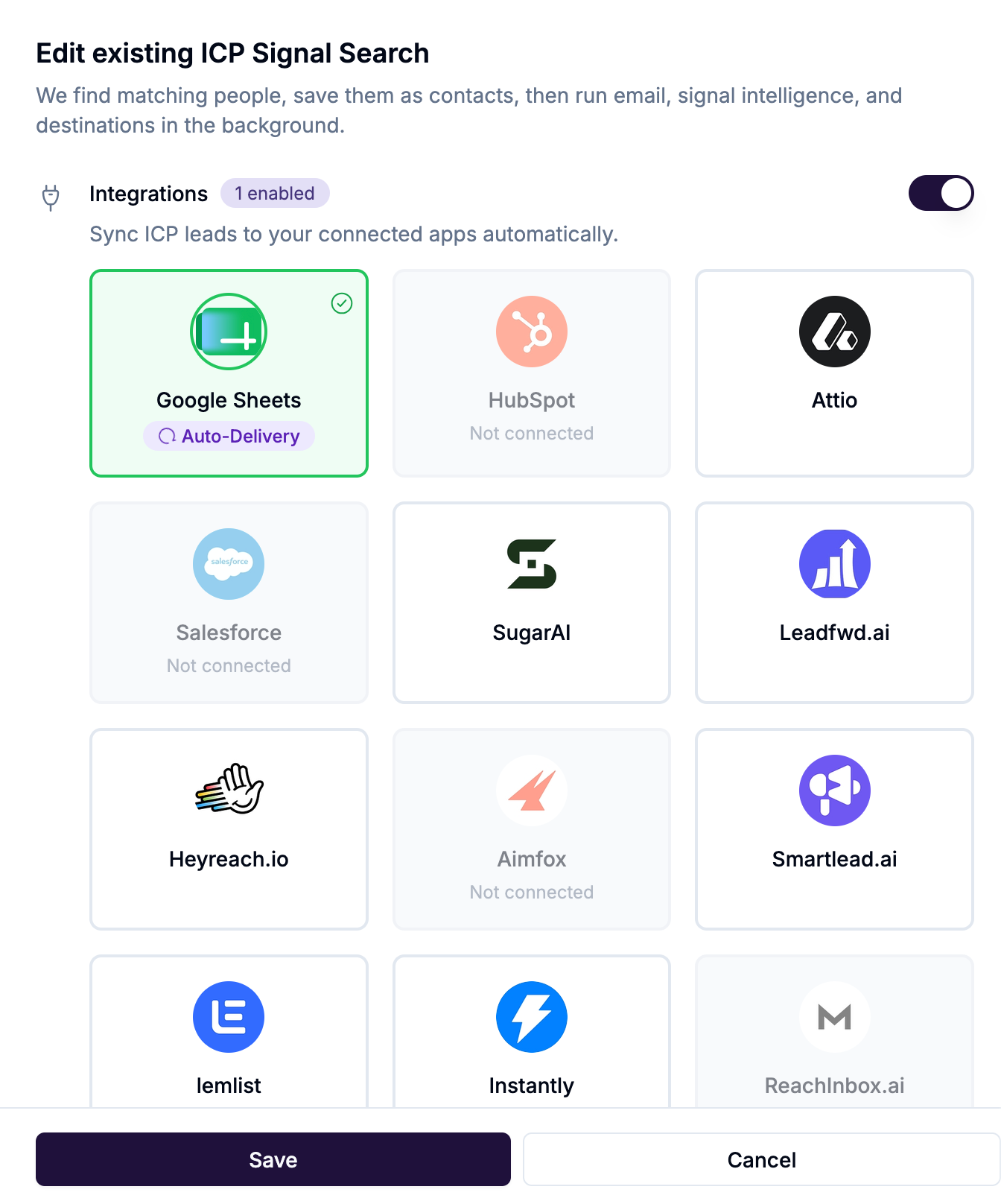
Connect the app first in Settings → Integrations.
Data we save on every match
These are standard contact fields from the people search (before stacking):
Name, LinkedIn profile, headline, job title, company name and LinkedIn page, location (city / country), education (school, degree), role start (when present), profile and company images, source icp_search, and a dedicated list for the search.
After company enrich (background): website domain, fuller firmographics, and funding when available.
After email finder: email + email status.
After the hiring signal check: any matched open roles at the company, tied to the role tags you defined.
Signal Stacking Intelligence: custom properties
When Stack Signal Intelligence finishes, we write research onto the contact as workspace custom properties. They appear:
On the contact profile under Signal Intelligence and Research
In Contacts as
Custom: {label}columnsIn Google Sheets, webhooks, and CRM exports
Three fields sit immediately after Company in the spreadsheet (not prefixed with Custom:). Everything else is a trailing Custom: column.
Measuring the Signal
Trailing Custom: properties
Icebreaker is blank unless Generate Icebreaker is enabled and the line passes quality checks. Signal Strength is always scored when stacking succeeds (no extra credit).
Credits at a glance
People below your signal-strength gate still cost the contact + stacking credits. They stay in Contacts and in the Sheet; we simply don't enroll or push them.
FAQ
Does a failed post-process lose the contact? No. The person is already in Contacts. Click the red chip to see who failed and which step (email, hiring check, stacking, or destination).
Will turning on hiring signals shrink my results? No. It doesn't filter who gets returned. It's a research layer that checks real job postings for roles you list and factors any match into Signal Strength. Every lead matching your audience criteria still comes through, hiring signals just help you tell which ones are worth prioritizing.
Why did two days look like the same place? The list stores the primary slice for that run. Editing audience or company size restarts rotation at the first geography (for a US-only search, that is California). Expand Runs to see returned / new / duplicates.
Can I get this without the UI? Yes, REST and MCP expose the same create, list, pause, resume, and trigger-run actions. Contacts are still read with list_id.